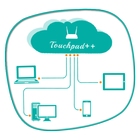
Want to feel your normal PC screen to touch screen. Then Try Touchpad++. It will realize you are working with touch screen computer. It allows you to control your PC with your phone/tablet.
How to use?
Download Touchpad++ server setup for window PC : http://bit.ly/1jfpyHO
•Install program on Pc, then Run it as administrator.
•Make sure PC and Android phone are in the same network. You can use android phone as portable hotspot and connect to PC.
•Run app on Android phone, then input IP address of PC and click “connect”.
Thank you.
Hope you Enjoy it.
Latest Version
1.1Uploaded by
Solange Flor
Requires Android
Android 2.2+
Category
Free Productivity AppContent Rating
Everyone
Report
Flag as inappropriateLast updated on Jun 29, 2016
This release includes minor bug fixes and general improvements. Update to the latest version for the best experience.



APKPure - A multi-platform app store primarily focused on Android, providing extensive app-related content. Discover the app you want easier, faster, and safer, with quick and efficient downloads and installations.