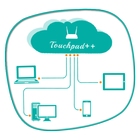
Want to feel your normal PC screen to touch screen. Then Try Touchpad++. It will realize you are working with touch screen computer. It allows you to control your PC with your phone/tablet.
How to use?
Download Touchpad++ server setup for window PC : http://bit.ly/1jfpyHO
•Install program on Pc, then Run it as administrator.
•Make sure PC and Android phone are in the same network. You can use android phone as portable hotspot and connect to PC.
•Run app on Android phone, then input IP address of PC and click “connect”.
Thank you.
Hope you Enjoy it.
En Son Sürüm
1.1Yükleyen
Solange Flor
Gereken Android sürümü
Android 2.2+
Kategori
Ücretsiz Verimlilik UYGULAMAİçerik derecelendirmesi
Everyone
Bildir
Uygunsuz olarak işaretleLast updated on Jun 29, 2016
Bu sürümde küçük hata düzeltmeleri ve genel iyileştirmeler bulunur. En iyi deneyim için en yeni sürüme güncelleyin.



APKPure - Android ağırlıklı, çok platformlu bir uygulama mağazası olup, geniş uygulama içeriği sunmaktadır. İstediğiniz uygulamayı daha kolay, hızlı ve güvenli bir şekilde keşfedin, hızlı ve verimli indirme ve kurulum imkanlarıyla.