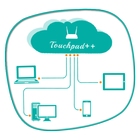
Want to feel your normal PC screen to touch screen. Then Try Touchpad++. It will realize you are working with touch screen computer. It allows you to control your PC with your phone/tablet.
How to use?
Download Touchpad++ server setup for window PC : http://bit.ly/1jfpyHO
•Install program on Pc, then Run it as administrator.
•Make sure PC and Android phone are in the same network. You can use android phone as portable hotspot and connect to PC.
•Run app on Android phone, then input IP address of PC and click “connect”.
Thank you.
Hope you Enjoy it.
เวอร์ชันล่าสุด
1.1อัปโหลดโดย
Solange Flor
ต้องใช้ Android
Android 2.2+
Category
ฟรี ประสิทธิภาพการทำงาน แอปการจัดประเภทเนื้อหา
Everyone
รายงาน
ปักธงว่าไม่เหมาะสมLast updated on Jun 29, 2016
เวอร์ชันนี้มีการแก้ไขข้อบกพร่องเล็กน้อยและการปรับปรุงทั่วไป อัปเดตเป็นเวอร์ชันล่าสุดเพื่อประสบการณ์ที่ดีที่สุด



APKPure - ร้านค้าแอปพลิเคชันแบบมัลติแพลตฟอร์มที่มุ่งเน้นระบบ Android เป็นหลัก พร้อมให้บริการเนื้อหาที่เกี่ยวกับแอปอย่างครบครัน ค้นพบแอปที่คุณต้องการได้ง่าย รวดเร็ว และปลอดภัยยิ่งขึ้น พร้อมการดาวน์โหลดและติดตั้งที่รวดเร็วและมีประสิทธิภาพ