
File Locker helps when you share a phone or tablet and want to keep personal files away from others. With File Locker APK, content is encoded so pictures, videos, and documents stay private outside the app. It focuses on everyday privacy while keeping routine access simple. In short, it supports large media as well as smaller items, and fits regular use at home or work. You protect content without changing how you browse your files day to day.
Content and filename encryption
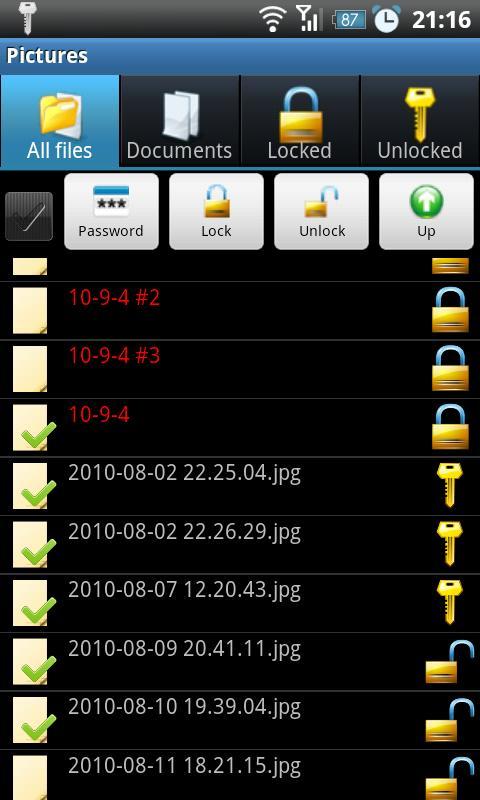
File Locker encodes both file contents and file names, making items unreadable outside the app. Before you download File Locker, note there is no password recovery because the password is not stored. The app uses one way encryption for verification. Do not rename encrypted files in other apps, or the original name cannot be restored.
Fast lock for large media
To handle big videos or other large files efficiently, File Locker offers an optional quick lock that hashes only the beginning and the end. This speeds up protection for huge items. Use it when faster processing is needed without touching every part of the file.
Reminders for temporarily unlocked files
If you unlock a file briefly, File Locker tracks it and shows notifications. These reminders help you notice documents or media left unprotected, so you can lock them again.
Directory browsing and system scan
File Locker scans folders to show both locked and unlocked items. You can browse directories and open documents from the app. After changes, it triggers the system media scanner automatically so other apps see updates.
File Locker focuses on everyday protection for photos, videos, and documents, and supports large files with quick locking. It reminds you about temporarily unlocked items and integrates with system scanning for smoother updates. Before installing File Locker latest version, note the password cannot be recovered and encrypted names should not be changed in other apps.
Latest Version
1.1.0Uploaded by
Ahmad Rafli
Requires Android
Android 2.1+
Category
Free Tools AppContent Rating
Unrated · Warning – content has not yet been rated. Unrated apps may potentially contain content appropriate for mature audiences only.
Report
Flag as inappropriateLast updated on Jul 7, 2015
- Android KitKat 4.4 support added
- New hashing algorithm that resolves corrupt files problem
- Others minor bugs resolved



APKPure - A multi-platform app store primarily focused on Android, providing extensive app-related content. Discover the app you want easier, faster, and safer, with quick and efficient downloads and installations.