Scan Date:Apr 21, 2026
Show More
Zoho Scanner is an all-in-one document scanner app to scan documents, convert to PDF, and organise your docs easily. Fast, accurate, and redesigned with a clean interface, it now includes AI-powered features to make scanning, saving, and managing documents smarter.
Turn your phone into a powerful PDF scanner and OCR scanner. Scan to PDF, extract text using OCR, translate content, sign documents, and share files instantly with a fast and reliable scanner app.
SCAN ANYTHING
Open Zoho Scanner, the best document scanner app in the store, hold it straight against the document you would like to scan. The scanner app will automatically detect the document's edges. You can then crop, edit, rotate and apply filters and export the document as either PNG or PDF with a single tap.
E-SIGN
Verify your identity by dropping in your signature from Zoho Sign. Add initials, names, signing date, email address, and more to your scanned document.
IMAGE TO TEXT
Extract the text from your scanned documents to share the content as a .txt file. OCR also helps you search for files using keywords from the content in the scanned document.
TRANSLATE
Translate extracted content from scanned documents into 15 different languages: French, Spanish, German, Russian, Chinese, Japanese, Portuguese, and Italian and more.
SHARE & AUTOMATE
Upload scanned documents to your favorite cloud storage like Notebook, Google Drive, Dropbox, OneDrive, Zoho Expense, and Zoho WorkDrive. Share scanned docs via email and messaging apps such as WhatsApp or save them to cloud services with the Auto Upload feature. Create workflows to simplify your tasks and save time.
ORGANIZE
Stay organized by creating folders, setting reminders, and adding tags to categorize and find documents easily. Auto Tags will recommend tags based on the content inside the doc.
ANNOTATE & FILTER
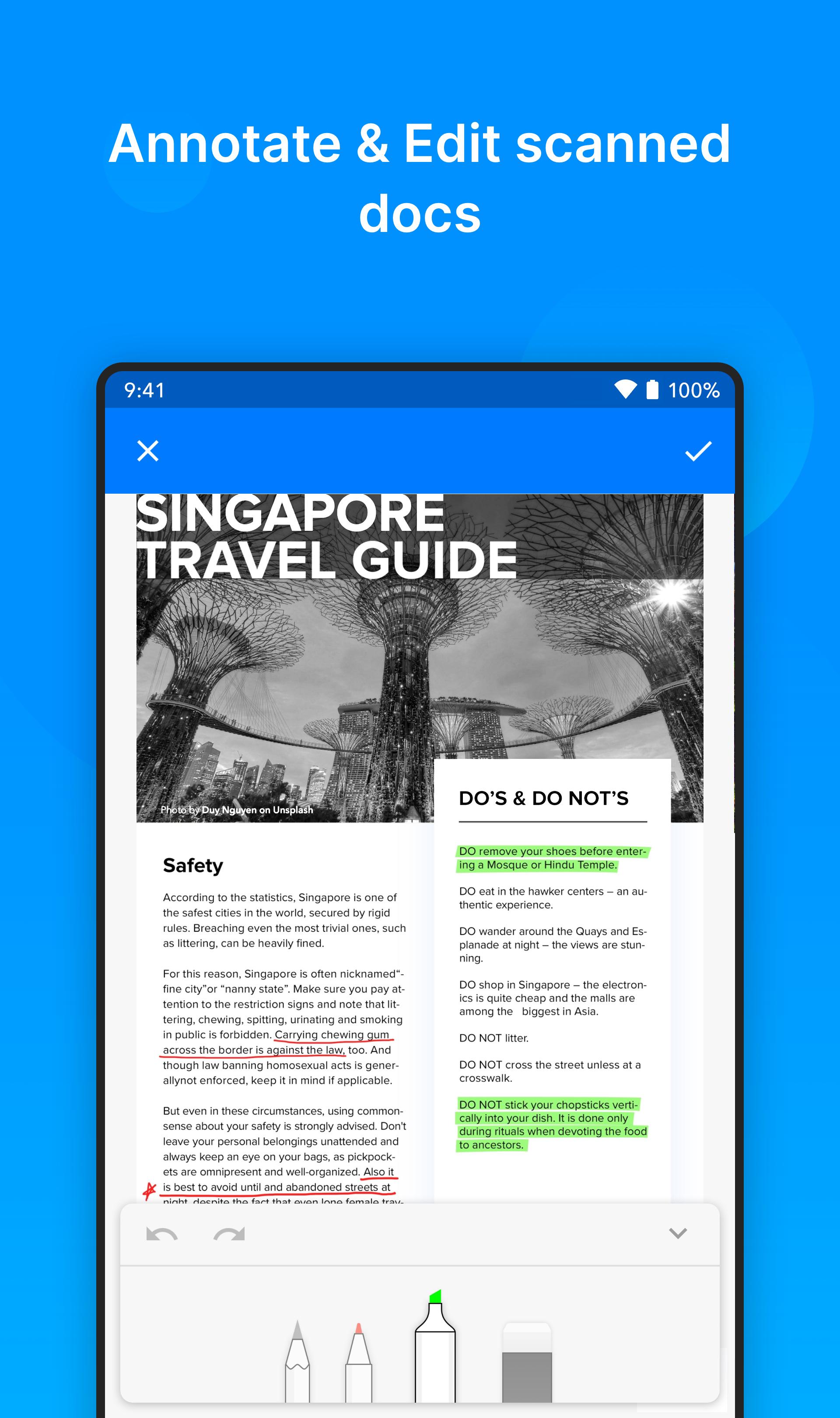
Crop out unwanted areas scanned images and resize them as needed. Annotate scanned copies with three different marker tools and re-order pages in a set of scanned docs. Choose from a set of filters to apply on the scanned documents.
Zoho Scanner has two paid plans, Basic and Premium. Basic is a one time purchase plan priced at USD 1.99 and Premium is a monthly/yearly subscription plan priced at USD 4.99/49.99 respectively.
BASIC
- Choose from five different app themes.
- Set reminders for documents.
- Secure your documents using finger print.
- Use document content to search for documents.
- Choose from a set of filters of your choice.
- Remove watermark from documents while you share.
- Set upto 2 workflows to cater for your sharing needs.
PREMIUM
Including all the Basic Plan features mentioned above,
- Digitally sign up to 10 documents yourself.
- Automatically back up your scanned docs in Google Drive.
- Extract the text from scanned docs and share the content as .txt file.
- Translate extracted content from your scanned documents into 15 different languages including French, Spanish, German, Russian, Chinese, Japanese, Portuguese, Italian and more.
- Create unlimited workflows based on your sharing needs.
- Auto upload scanned docs to your favorite cloud storage including Notebook, Google Drive, Dropbox, OneDrive, Zoho Expense, and Zoho WorkDrive.
- Get intelligent tag suggestions with Zia for your scanned docs.
- Let Zoho Scanner read the document for you.
GET IN TOUCH
We always would love to hear from you. If you have any feedback to share, please contact us directly from the app (Settings > scroll down > Support). You can also write to us @ isupport@zohocorp.com.
Latest Version
3.4.4Uploaded by
Samija Malkoč
Requires Android
Android 10.0+
Category
Free Productivity AppContent Rating
Everyone
Security Report
Report
Flag as inappropriateLast updated on Apr 21, 2026
Minor bug fixes and improvements. Install or update to the newest version to check it out!





APKPure - A multi-platform app store primarily focused on Android, providing extensive app-related content. Discover the app you want easier, faster, and safer, with quick and efficient downloads and installations.