

Samsung Messages helps users handle everyday texting on Samsung phones, from simple updates to sharing photos with contacts. It comes preinstalled on many Samsung devices, so your conversations stay in one place with a familiar layout. When reinstalling or setting up a device, you can find the Samsung Messages APK to restore the official SMS and MMS client. Moreover, the app focuses on clarity and comfort, making message management straightforward for daily use. It supports standard texting needs across personal and work contexts.
Intuitive conversation layout
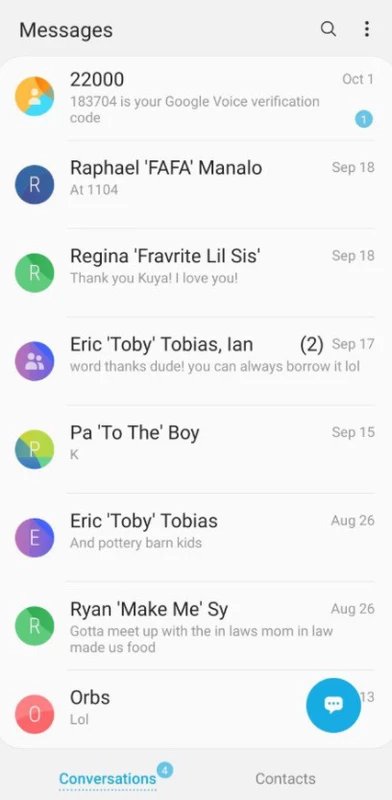
Samsung Messages organizes messages chronologically to help you spot what you need fast. Swipe across the screen to browse threads and tap any conversation to view it right away. Older threads remain accessible without breaking the order of your inbox.
Efficient search tool
Beyond layout, the built in search helps you locate content quickly.
Contact blocking controls
Additionally, you can block unwanted senders by tapping on them. This is helpful when you receive unwanted messages from specific numbers.
Notification and read management
Finally, mark incoming notifications as already read to reduce clutter and focus on active chats. This small control helps keep your notifications organized during busy days. If it is not available on your phone, you can download Samsung Messages to access these settings.
Samsung Messages offers a familiar way to manage SMS and MMS on Samsung devices. Install or update to the Samsung Messages latest version to keep core texting tools close at hand. Users can start sending, searching, and organizing conversations with a clear layout.
Latest Version
16.7.91.101Uploaded by
Samsung Electronics Co., Ltd.
Requires Android
Available on
Samsung Electronics Co., Ltd.
Category
Free Tools AppReport
Flag as inappropriateLast updated on Aug 7, 2026
This release includes minor bug fixes and general improvements. Update to the latest version for the best experience.




APKPure - A multi-platform app store primarily focused on Android, providing extensive app-related content. Discover the app you want easier, faster, and safer, with quick and efficient downloads and installations.