
Table of Content
1. Overview
2. How to configure and use PEK
3. PEK as a conventional soft keyboard/no randomization
4. PEK with Chinese language input support
5. Privacy policy
1. Overview
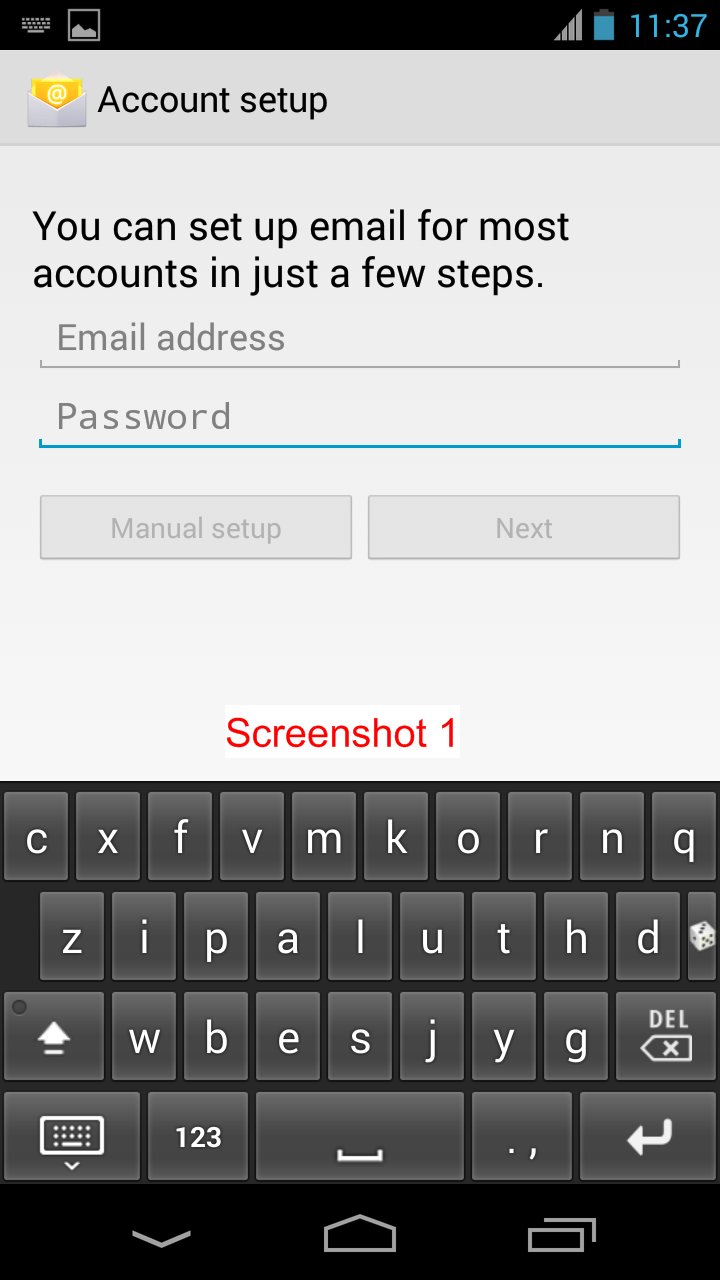
PEK is a novel context aware privacy enhancing keyboard for touch-enabled device. When a user inputs normal text like an email or a message, PEK shows a normal QWERTY keyboard or a system default keyboard. However, every time a user of a touch-enabled device presses a password input box on the screen, PEK will randomly shuffle the positions of the characters on the keyboard and show this randomized keyboard to the user. PEK's usability is well preserved since PEK is context aware. That is, a randomized keyboard shows up only when a user inputs a password or pin, and users do NOT input passwords quite often in their daily use of a touch-enabled device.
PEK can resist various attacks including the fingerprint attack disclosing passwords from fingerprints left on touch screen, attacks by malicious apps reading orientation and accelerometer data to infer tapped passwords, attacks utilizing vibrations of tapping keys, attacks exploiting thermal residue of finger left on the pressed keys on a keypad in order to infer tapped keys or pins, and various shoulder surfing attacks.
2. How to configure and use PEK
After PEK is installed, please configure the settings to use PEK following the steps below.
1. Press the PEK_Setting app icon on the launcher screen.
2. Press the button named Open Android Input Settings.
3. Switch on "Privacy Enhanced Keyboard".
4. Press "OK" and ignore the "Attention" warning, which is a generic warning when a third-party keyboard is installed. Note: We collect nothing from users.
For Android 5.0 systems and above, switching to PEK is made easy. While inputting, touch the keyboard icon (switcher) on the bottom right of the navigation bar and choose PEK.
For older Android systems, once PEK is installed and configured via the four steps above, please switch to PEK as instructed below.
1. Touch the input box and find a small keyboard icon on the top left notification bar, as shown in Screenshot 6.
2. Slide down the notification bar, you can see a menu as shown in Screenshot 7 and tap the "Choose input method".
3. Select PEK as shown in Screenshot 8.
4. Done. Have fun!
Directly setting PEK as the default keyboard is trickier. Configuration steps for different Android phones are slightly different. The steps below serve as a guideline.
After PEK is installed, please configure the settings of an Android phone to use PEK using the following steps.
1. Go to "Settings" -> "Language & input" as shown in Screenshot 3.
2. Check "Privacy Enhancing Keyboard", as shown in Screenshot 4.
3. Press "OK" and ignore the "Attention" warning, as shown in Screenshot 5. This is a generic warning when you install a third-party keyboard. Note: We collect nothing from users.
3. Set PEK as a default keyboard by clicking "Default".
4. Done. It should work as promised.
Note: If you want to use our keyboard PEK to unlock your device, please first follow the steps above. Then go to "Settings" -> "Security" -> "Screen lock" and select "Password".
3. PEK as a conventional soft keyboard
A button with two crossing arrows is used to toggle on/off the keyboard randomization. The PEK_Setting app can be used to toggle on/off the randomization too.
4. PEK with Chinese language input support
PEK Chinese 隐私增强键盘 is available on Google Play!
5. Privacy policy
The app collects nothing from users and does NOT request the Internet permission.
Latest Version
3.2.3.3Uploaded by
ศุภบดินทร์ ศรีประชา
Requires Android
Android 4.0+
Category
Free Tools AppContent Rating
Everyone
Report
Flag as inappropriateLast updated on Jul 20, 2017
Removed WRITE_EXTERNAL_STORAGE permission request.




APKPure - A multi-platform app store primarily focused on Android, providing extensive app-related content. Discover the app you want easier, faster, and safer, with quick and efficient downloads and installations.