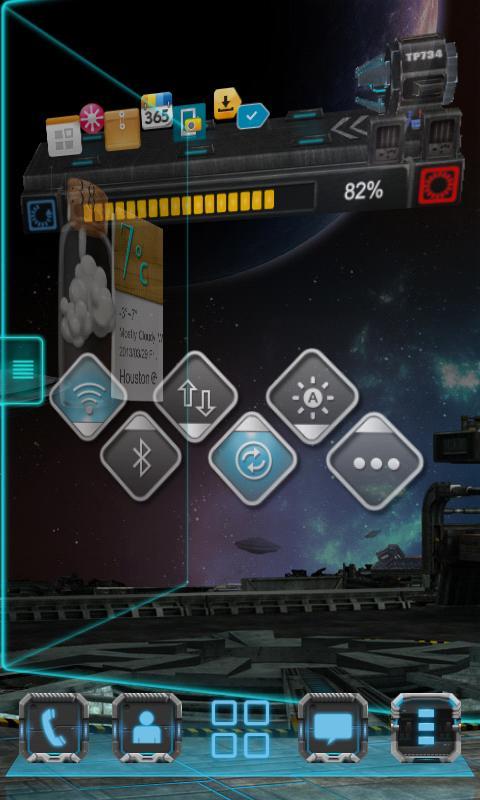
Next Switch Widget is a kind of tools that is based on Next Launcher 3D. It provides you a fast way to turn on/off the functions in common use, such as Wifi, GPS, brightness, screen lock, bluetooth etc.
The glorious visual elements and dynamic effects of Next Switch Widget will absolutely give you unique visual enjoyment.
Notice:If Next switch widget can't be displayed on your Next Launcher, maybe your Next Launcher is an unpaid version. It's note safe. Please uninstall this copy and install Next Launcher in Google Play if you like it.
Available Size:
-4x1
-3x3
-1x1
Actions:
- Functions: Wifi, Ringer, Brightness, Bluetooth, MobileNetwork, GPS, Auto-sync, Airplane mode, Vibrate, ScreenTimeout, Lock screen, Ringer volume, Media volume
- Upward and downward gesture:more switches
- Tap “more” button:toggle position modification
Unable to uninstall?
To lock screen, the widget must be set as the device administrator. Once it's done, you cannot uninstall the widget directly. If you happen to uninstall it, you can follow the instruction below:
Enter the "Settings" menu -> "Location and security" -> "Select device administrators" -> Make sure "Next Switch Widget" is not selected -> Then uninstall the widget
How to uninstall?
Since Next Switch Widget has the right to lock screen, to UNINSTALL it, you must execute the steps below first.
Press the "menu" button in home screen of Next Launcher -> Select "Settings" -> Select "Location and Security" -> Select "Select device administrators" -> Make sure "Next Switch Widget" is not selected. Then try uninstall the widget like other usual applications.
Some toggles may be out of work after your Next Switch Widget is upgraded. Please refer to the instruction below to figure them out.
For the WiFi toggle (the instruction may be varied a little in different phones)
Settings -> Wireless and network -> Wi-Fi settings -> Unselect “WiFi” -> Then try the WiFi toggle in the widget to open the WiFi network.
For the Bluetooth toggle (the instruction may be varied a little in different phones)
Settings -> Wireless and network -> Bluetooth settings -> Unselect “Bluetooth” -> Then try the Bluetooth toggle in the widget to open the Bluetooth function.
For the screen lock toggle (the instruction may be varied a little in different phones)
Settings -> Location and security -> Select device administrators -> Unselect “Next Switch Widget” -> Then try the “screen lock” toggle in the widget to lock the screen.
How to add Next Widgets to your home screen?
- Long press home screen of Next Launcher. Press the Widget option and choose the widget you like. Make sure you have enough room for the widget.
If you encounter any problems or have any suggestions for our Next Launcher, please do not hesitate to tell us. Thank you very much!
E-mail: nextlauncher@gmail.com
Facebook: www.facebook.com/NextLauncher
Google+: https://plus.google.com/u/1/104540424317126374535/posts
Latest Version
1.20.2Uploaded by
Megat Yusuf
Requires Android
Android 2.2+
Category
Free Productivity AppContent Rating
Everyone
Report
Flag as inappropriateLast updated on Jul 3, 2015
V1.20.2
1.(Fix) Some FC bugs
V1.20.1
1.(Fix) Some FC bugs
2.(add) 1x1 style switch icon
V1.20
1.(Add)3x3 style





APKPure - A multi-platform app store primarily focused on Android, providing extensive app-related content. Discover the app you want easier, faster, and safer, with quick and efficient downloads and installations.