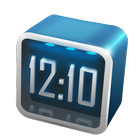
Next Clock is a 3D Clock Widget specially designed for Next Launcher 3D. Make your phone look different, Just try it.
Available Size:
-4x1
-3x3
Actions:
- Glide up and down on the widget to change digital clock and analog clock
- Show the time zone
- Click on the widget to enter system clock settings page
Hint:
- Please install the latest version of Next Launcher before use Next Clock Widget.
- World clock function will come with Next version. Please stay tuned.
If you encounter any problems or have any suggestions for our Next Launcher, please do not hesitate to tell us. Thank you very much!
E-mail: nextlauncher@gmail.com
Facebook: www.facebook.com/NextLauncher
Google+: https://plus.google.com/108624381722454375934/posts
Latest Version
1.39Uploaded by
Syita Layinatu
Requires Android
Android 2.2+
Category
Free Tools AppContent Rating
Everyone
Report
Flag as inappropriateLast updated on Jul 3, 2015
V1.39
1.(Fix) Some FC bugs
V1.38
1.(Fix)3*3 clock stuck issue



APKPure - A multi-platform app store primarily focused on Android, providing extensive app-related content. Discover the app you want easier, faster, and safer, with quick and efficient downloads and installations.