
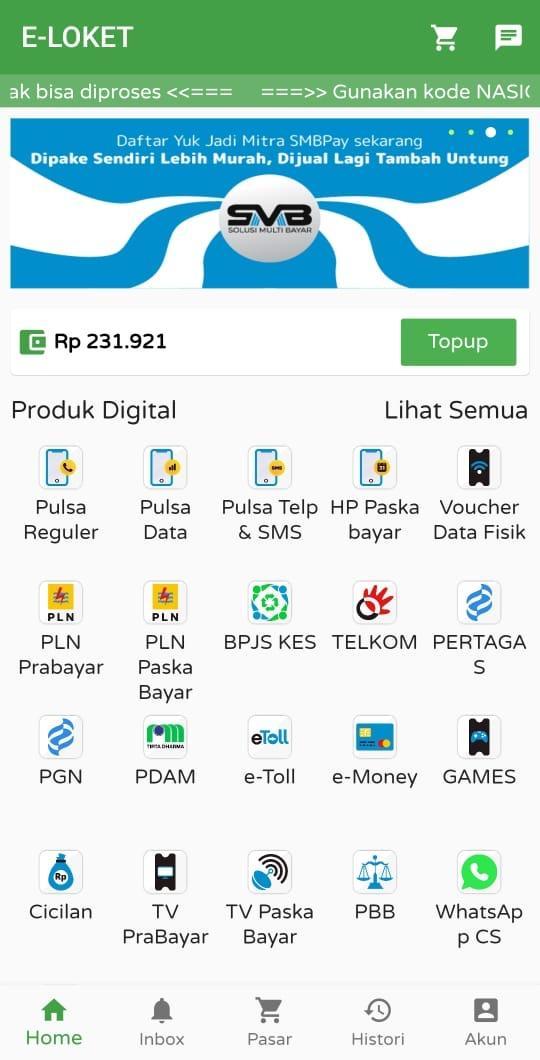
Applications that provide facilities from purchasing and paying credit, electricity, e-money, TV subscriptions, BPJS, PDAM, and others.
Easy, Fast and Cheapest Transactions.
The solution for all your purchases and electronic payments, only at Online Counters
HOW TO JOIN:
1. Download and Install
Download the Free Online Counter application on the Playstore, then Install and allow the application to access your cellphone.
2. Login or Register
If you are already registered, simply login using your registered mobile number and your transaction PIN.
If you haven't registered yet, please register by signing in using your google play account then register by filling in your data, and you will automatically be registered as a Loket Online user
3. Top Up Deposit Balance
fill in your balance via bank transfer to the account listed on the application only, by taking a ticket for your unique code, if you have made the transfer, just wait 5 minutes the balance will go directly to your application.
4. Transaction
If you have filled in the balance, you can make transactions available on the Online Counter application menu, such as credit purchases, electricity payments, BPJS, Telkom, PDAM, game vouchers... and others
5. Downline Registration
In addition to being used alone, the Loket Online application can register downlines or agents according to what you want through the menu in the application with benefits that you can set yourself so that it can be maximized.
6. Balance Transfer
You can transfer the balance on the downline that you have registered by entering the menu in the Online Loket application
CUSTOMER SERVICE
If there are difficulties you can contact us by telephone or live chat and email us,
Phone: +6231 8010108
Live Chat: +6281 6565 778 (WA)
Email: cvsimbasby@gmail.com
Website: www.loketonline.net
Latest Version
10.0Uploaded by
Ja Apichat
Requires Android
Android 5.0+
Category
Free Shopping AppContent Rating
Everyone
Report
Flag as inappropriateLast updated on Oct 14, 2021
new logo






APKPure - A multi-platform app store primarily focused on Android, providing extensive app-related content. Discover the app you want easier, faster, and safer, with quick and efficient downloads and installations.