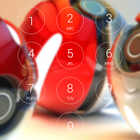
Lock screen with passcode security, iphone style and Pokeball HD background image.
- Iphone lock screen style.
- Set Passcode to unlock screen, enable/ disable passcode,
- Comprehensive settings for personalization.
- Highly simulate the Phone 6, 6s theme.
- Enable/ disable Sound.
How to Use:
1. Open the app settings, and tick the "Enable Screen" checkbox to enable it.
2. Click the "Disable Lockscreen System" in case you use the system lock.
3. Click the "Change Wallpaper" to switch to different beautiful backgrounds.
4. Tick the "Passcode" checkbox if pin mode is required.
Aktuelle Version
1.01Von hochgeladen
Imad Ali Zebari
Erforderliche Android-Version
Android 4.0.3+
Kategorie
Gratis Tools APPAltersfreigabe
Everyone
Last updated on Mar 31, 2017
- Fix bugs



APKPure – Ein plattformübergreifender App-Store mit Fokus auf Android, der eine Vielzahl an Apps und relevanten Inhalten bietet. Entdecken Ihre gewünschte App, laden und installieren Sie schneller, sicherer und effizienter.