Scan Date:Apr 14, 2026
Show More
Get 5 in 1 stamps on photo options in one single App! Add stamp from auto
stamper in-app custom camera specially designed for stamping Activities. You can make your photo informative as well as communicating with the help of an auto Stamping application.
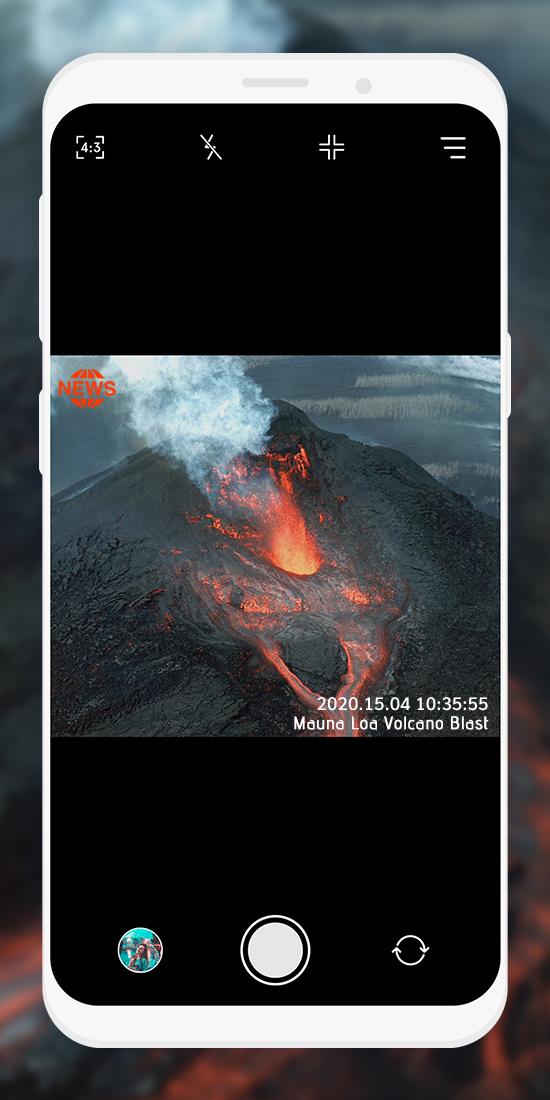
5 different stamps - Date time stamp, Signature stamp, Location stamp, Logo stamp, Sequence stamp available to add on photos clicked with Auto stamper time stamp camera application.
How Autostamper custom camera: Add Geotag & Timestamp Application works?
➽ When you open Application, You will get Custom camera of Auto stamper to click photos.
➽ You can change Camera settings
➽ From Menu, you can ON/OFF Stamps that you require on your photos from Date stamper, Signature stamp, Logo Stamp, GPS location Stamp & Sequence Stamp.
➽ For each stamps, you can set and edit style, format, size, position of stamps
➽ You will get all selected stamps on your photo when you click from date and time stamper camera.
Interesting Features:
You can set or change camera Settings for:
⧪ Ratio
⧪ Grid
⧪ Flash
⧪ Rotate
You can directly turn on/off Date and Time stamp, Location stamp, Logo stamp, Signature stamp on camera screen for stamper photo by clicking on stamp setting option.
In Date and time stamp camera settings following features available:
➤ On/Off Toggle
➤ Change Date & Time Format
➤ Adjustable Stamp Size
➤ Variant Stamp Style
➤ Set Stamp position
➤ Change Stamp color
➤ Check preview by clicking on 👁️.
From signature Stamp settings, following changes are possible:
➤ On/Off Toggle
➤ Add custom signature text
➤ Adjustable Stamp Size
➤ Variant Stamp Style
➤ Set Stamp position
➤ Change Stamp color
➤ Check preview by clicking on 👁️.
For Logo stamp settings, following options are available:
➤ On/Off Toggle
➤ Upload/change logo image
➤ Set transparency level
➤ Adjustable Stamp Size
➤ Variant Stamp Style
➤ Set Stamp position
➤ Check preview by clicking on 👁️
In GPS Location Stamp settings, you can add following changes:
➤ On/Off Toggle
➤ Add custom / current Location
➤ Adjustable Stamp Size
➤ Variant Stamp Style
➤ Set Stamp position
➤ Change Stamp color
➤ Check preview by clicking on 👁️.
In Sequence Stamp settings, you can add following changes:
➤ On/Off Toggle
➤Change Sequence Format
⊿Add Sequence Number
⊿Select Sequence type as increasing / Decreasing
⊿Set suffix/ prefix number
⊿Add sequence Repeat number
⊿Select Sequence number Unit
➤ Adjustable Stamp Size
➤ Variant Stamp Style
➤ Set Stamp position
➤ Change Stamp color
➤ Check preview by clicking on 👁️.
Why do you need to have *Auto stamper custom camera : Add Geotag & Timestamp* application in your smartphone?
➽ To Add Date time stamp on Photo
➽ Auto time stamp options with stamper camera
➽ To have GPS stamp & geo tags on clicked pictures
➽ get date stamp, text stamp, image stamp, location stamp easily.
➽ date time stamper for easy photo stamping
➽ Easy picture stamp with Custom camera
➽ Auto stamper for photos - edit your photo having stamps
➽ Timestamp camera with advanced features at one place
Click pictures by using this Application, and share with your family and friends. Use this application for multiple purposes and explore the world with this handy tool easily available in your smartphone.
Latest Version
1.0.14Uploaded by
Noor Ul Ain Athar
Requires Android
Android 6.0+
Category
Free Photography AppContent Rating
Everyone
Security Report
Report
Flag as inappropriateLast updated on Apr 14, 2026
Minor bug fixes and improvements. Install or update to the newest version to check it out!






APKPure - A multi-platform app store primarily focused on Android, providing extensive app-related content. Discover the app you want easier, faster, and safer, with quick and efficient downloads and installations.