Scan Date:Sep 3, 2025
Package Name:com.lazyqr.alwayson.amoled.alwayson.display.digitalclock.liveclock.wallpaper
SHA-256:9d20fd7376af599bd1f90430cedd057ab67f674597cb33c3f9740a5577a61caa
SHA-1:81806f41f230ebaf510c35ceba2557a3fa19531b
Show More
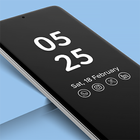
Always On Display Clock - AOD.
Only clock you will ever need on your device.
The Always On Display Clock - AOD app will revolutionize your lock screen experience!
This always on display clock widget keeps everything you need on your display, even when your phone is idle. With a huge lock screen clock and customizable display features, you can now make your phone more efficient.
Choose Always On Display Clock - AOD!
The Always On Display is your assistant right on your lock screen. Whether charging your phone or sitting idle, this AOD digital clock app ensures you have all the information you need right when needed. The always on display clock brings convenience and style to your phone.
Key Features
⏰ Huge Lock Screen Clock
Enjoy a huge lock screen clock that’s easy to read at a glance. Choose from a variety of clock designs and make your phone truly yours.
⏰Customizable Always On Display Clock Widget
With the always on display clock widget, you can pick your favorite designs and personalize your screen to suit your style. Choose from digital or analog clocks and customize everything from the brightness to the size.
⏰AOD Digital Clock
The AOD digital clock is perfect for those who prefer a modern and sleek look. You’ll know the time, date, and essential notifications with a glance.
⏰Energy-Efficient Display
The always on display clock is designed to be highly energy-efficient.
⏰Choose When to Display
The Always On Display Clock gives you full control over when your display is active.
⏰Prevent AMOLED Burn-In
The always on display clock widget is smart enough to prevent screen burn-in on AMOLED displays.
Make the Most of the AOD Digital Clock!
🕰️ Personalize Your Clock
Use the huge lock screen clock to customize the way your phone looks. The always on display clock is entirely customizable to match your taste.
🕰️ Easy Access to Notifications
With the always on display app, all your alerts are in one place, so you don’t have to unlock your phone.
🕰️ Control Your Display Brightness
Whether it’s day or night, you can easily adjust the brightness of your AOD digital clock to match your environment.
🕰️ Live Clock Wallpapers
Take your customization even further by setting clock live wallpapers on your home or lock screen.
🕰️ Night Mode
The always on display clock also works as a night clock!
Additional Features:
Double Tap to Wake
Display Battery Percentage
Memo Option
Calendar Clock
Clock Live Wallpaper
Setup and Use
Setting up your always on display clock is as simple as installing the app and choosing your preferences. Customize your huge lock screen clock, select when to display it, and enjoy!
Download Now!
Enhance your phone experience with the Always On Display Clock - AOD. Whether you want a huge lock screen clock to keep track of time or a sleek, always on display clock widget to manage notifications, this app has it all.
Download the AOD digital clock app today and transform how you use your phone!
Latest Version
4.1.0Uploaded by
مراد كمال
Requires Android
Android 6.0+
Category
Free Personalization AppContent Rating
Everyone
Security Report
Report
Flag as inappropriateLast updated on Sep 27, 2024
Minor bug fixes and improvements. Install or update to the newest version to check it out!




APKPure - A multi-platform app store primarily focused on Android, providing extensive app-related content. Discover the app you want easier, faster, and safer, with quick and efficient downloads and installations.