Voice recorder
Voice recorder - Audio recorder
Smart recorder - High quality recordings.
Voice recorder application is best recorder application. You can reliably record your meetings, personal notes, speeches, lectures, songs. There is no time limits.
This application can record most of your sound and voice. You can record a business meeting, a lecture, an interview, song practices. This app is a best choice.
Audio recorder application was designed carefully, users will feel convenient while using it. It has basic functions for your recording work, functions are arranged in smart way.
Audio recorder has great edit tools for cutting and joining recording files. With the cutting tool, you can remove some parts you don't like by using cut option or remove middle option. With the joining function, you can join some recording files into a longer audio files.
Voice recorder supports two popular file formats: Mp3, Wav. The quality of recording very high.
Voice recorder let you store recording files on internal memory or external memory. That means you can choose to store your recording files on SD card.
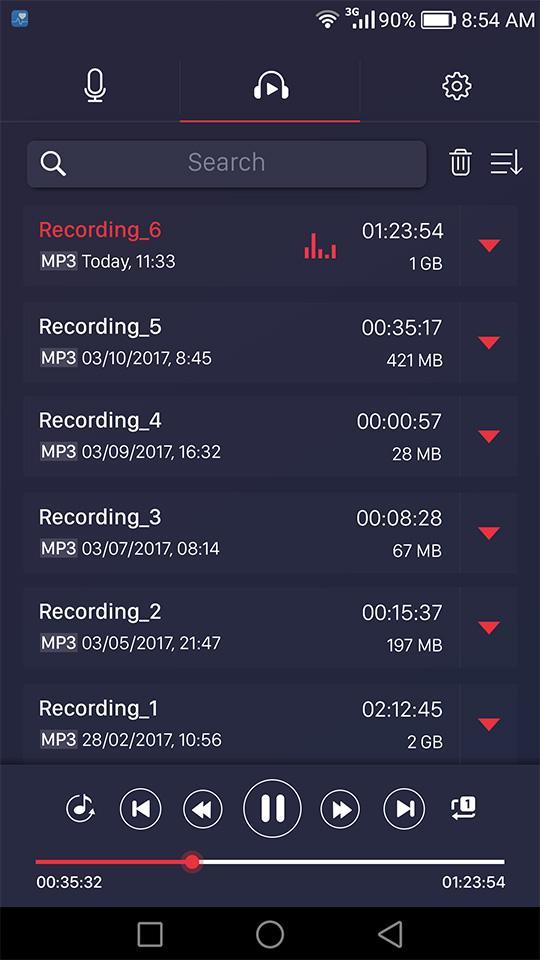
Audio recorder helps you manage your recording files on a list screen with many options: sort by name/date, edit name, playback, cut, delete, share.
Audio recorder has smart playback screen which let users change speed of playback; easy way to rewind and go to previous.
Our recorder app can record by internal mic or exter mic. You can use mic on your headphone or you can use bluetooth mic.
Features:
- Record voice with high quality
- Support SD cards
- Support headphone mic, bluetooth mic
- Simple user interface, easy to use.
- Supported operations in this Version
- Recording with high quality.
- Format file: mp3, Wav
- Play, pause, stop audio file.
- Can change speed of playback
- Send/Share your recording.
- Delete your recording right from the app.
- Save the recording file.
- live audio spectrum analyzer
- mp3 encoding with adjustable sample rate (8-44 kHz)
- recording in background (even when display is off)
- microphone gain calibration tool
- save/pause/resume/cancel recording process control
- easy to use recordings list
- send/share a recording via email, sms, mms, facebook, whatsapp, dropbox, etc.
- not support call recorder
Most of your sound and voice: a business meeting, a lecture, an interview, song practices. This app is a best choice for recording.
Latest Version
7Uploaded by
Marie-France Mablouké
Requires Android
Android 4.1+
Category
Free Music & Audio AppContent Rating
Everyone
Report
Flag as inappropriateLast updated on Jun 12, 2019
Minor bug fixes and improvements. Install or update to the newest version to check it out!





APKPure - A multi-platform app store primarily focused on Android, providing extensive app-related content. Discover the app you want easier, faster, and safer, with quick and efficient downloads and installations.