How to use application
PREREQUISITE:You mobile device must support USB-OTG.
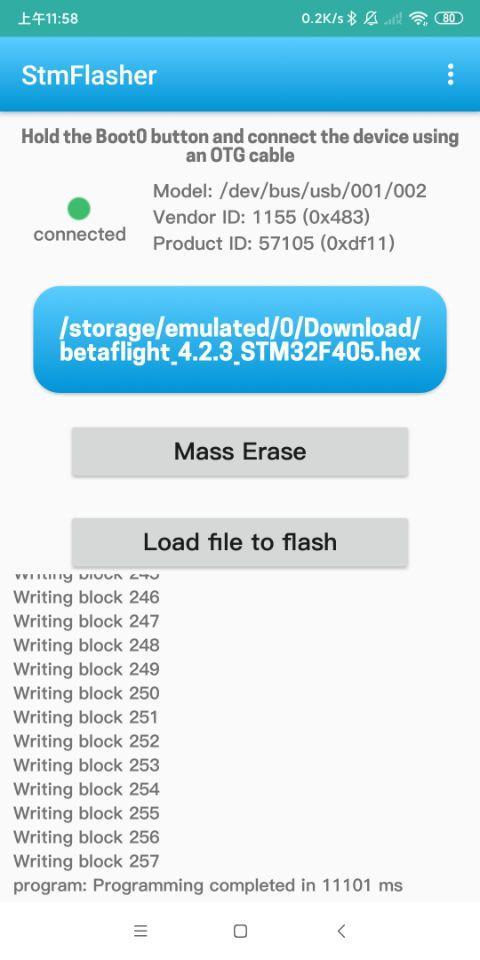
1. In general you should set pins BOOT0 and BOOT1 in correct combination according to model of your CPU.
2.Hold the Boot0 button and connect the device using an OTG cable.
Functions:
- Get chipset info
- Erase memory
- Write firmware
- Load firmware
Supported firmware file format:
- Binary (.bin)
- Intel Hex (.hex)
- Device Firmware Upgrade(.dfu)
Phiên bản mới nhất
1.0Được tải lên bởi
ปีเตอร์' รสกล้วยยย
Yêu cầu Android
Android 6.0+
Danh mục
Miễn phí Công cụ ỨNG DỤNGXếp hạng nội dung
Everyone
Báo cáo
Gắn cờ là không phù hợpLast updated on Feb 15, 2021
Update the STM32 chipset easily and quickly
How to use application
PREREQUISITE:You mobile device must support USB-OTG.
1. In general you should set pins BOOT0 and BOOT1 in correct combination according to model of your CPU.
2.Hold the Boot0 button and connect the device using an OTG cable.
Functions:
- Get chipset info
- Erase memory
- Write firmware
- Load firmware
Supported firmware file format:
- Binary (.bin)
- Intel Hex (.hex)
- Device Firmware Upgrade(.dfu)



APKPure - Kho ứng dụng đa nền tảng chủ yếu tập trung vào Android, cung cấp nội dung phong phú về ứng dụng. Khám phá ứng dụng bạn muốn dễ dàng, nhanh chóng và an toàn hơn, với tính năng tải xuống và cài đặt nhanh chóng và hiệu quả.