How to use application
PREREQUISITE:You mobile device must support USB-OTG.
1. In general you should set pins BOOT0 and BOOT1 in correct combination according to model of your CPU.
2.Hold the Boot0 button and connect the device using an OTG cable.
Functions:
- Get chipset info
- Erase memory
- Write firmware
- Load firmware
Supported firmware file format:
- Binary (.bin)
- Intel Hex (.hex)
- Device Firmware Upgrade(.dfu)
En Son Sürüm
1.0Yükleyen
ปีเตอร์' รสกล้วยยย
Gereken Android sürümü
Android 6.0+
Kategori
Ücretsiz Araçlar UYGULAMAİçerik derecelendirmesi
Everyone
Bildir
Uygunsuz olarak işaretleLast updated on Feb 15, 2021
Update the STM32 chipset easily and quickly
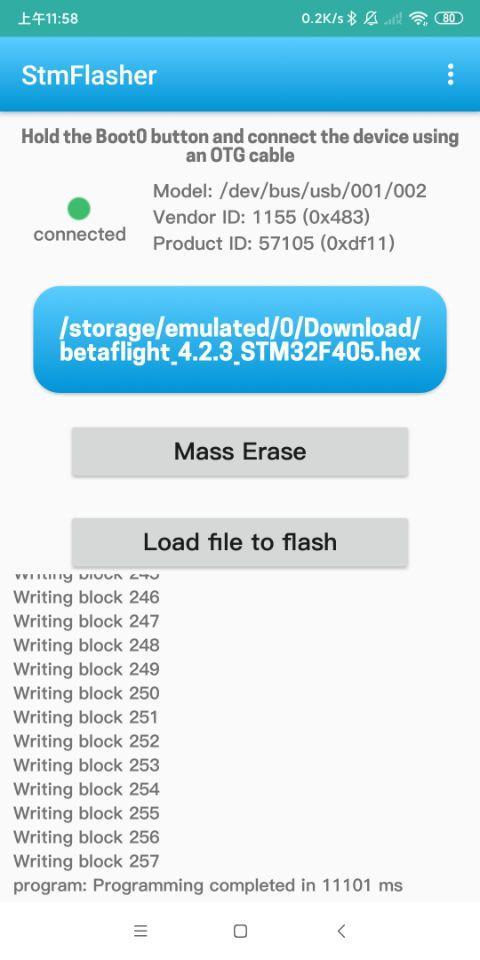
How to use application
PREREQUISITE:You mobile device must support USB-OTG.
1. In general you should set pins BOOT0 and BOOT1 in correct combination according to model of your CPU.
2.Hold the Boot0 button and connect the device using an OTG cable.
Functions:
- Get chipset info
- Erase memory
- Write firmware
- Load firmware
Supported firmware file format:
- Binary (.bin)
- Intel Hex (.hex)
- Device Firmware Upgrade(.dfu)



APKPure - Android ağırlıklı, çok platformlu bir uygulama mağazası olup, geniş uygulama içeriği sunmaktadır. İstediğiniz uygulamayı daha kolay, hızlı ve güvenli bir şekilde keşfedin, hızlı ve verimli indirme ve kurulum imkanlarıyla.