Package Name:com.gyokovsolutions.stroboscopeengineer
SHA-256:e3c3cf51ce623cc40ef805813ad742395a826018ae605717408a59f5b7fe8434
Show More
Stroboscope app and optical tachometer for measuring rotating, vibrating, oscillating or reciprocating objects. Optical tachometer can be used by starting it from MENU - TACHOMETER.
It is most commonly used for:
- adjusting speed of rotation - for example adjusting speed of rotation of turntable
- adjusting frequency of vibration
How to use:
1. Start app
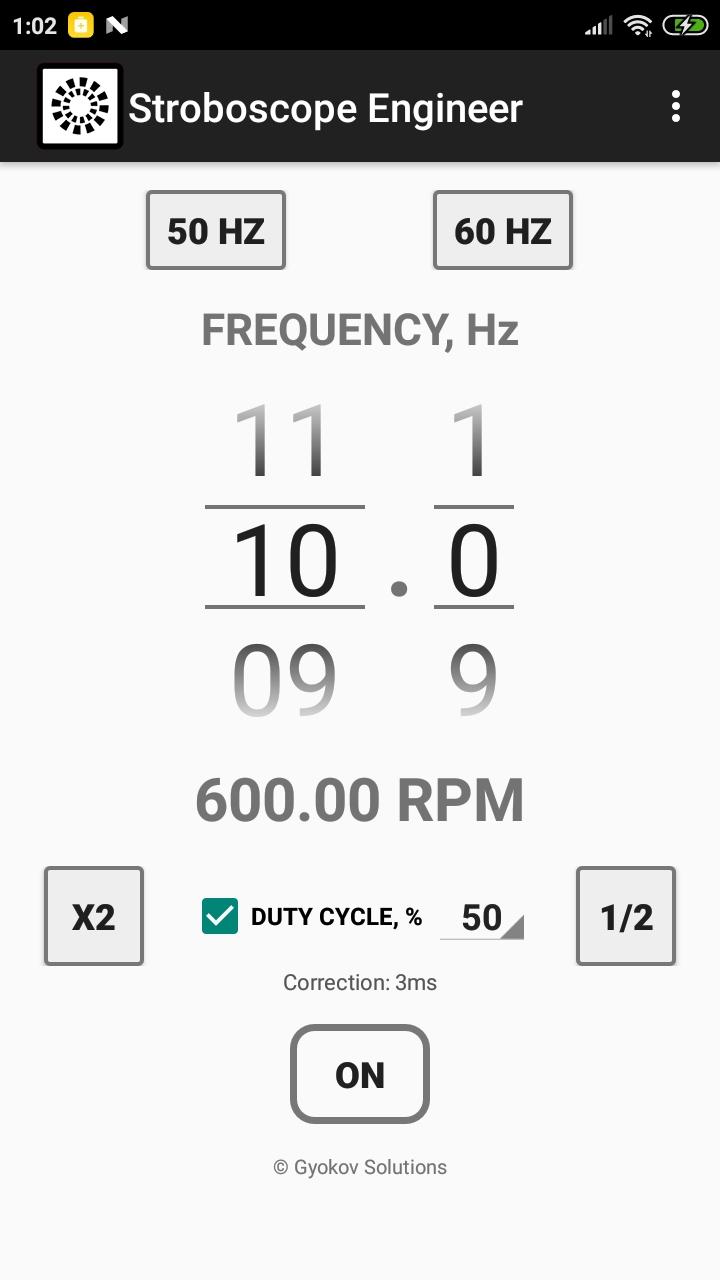
2. Set frequency of strobe light (in Hz) using number pickers
3. Press ON/OFF button to start the strobe light
- use button [x2] to double the frequency
- use button [1/2] to halve the frequency
- use button [50 Hz] to set frequency to 50 Hz. This is for turntable speed adjustment.
- use button [60 Hz] to set frequency to 60 Hz. This is also for turntable adjustment.
- activate duty cycle by checking [DUTY CYCLE] check box and adjust duty cycle in percentage. Duty cycle is the percentage of time per cycle when the flash light is on.
- optionally you can calibrate the app by starting calibration from MENU - Calibrate. It is good to do calibration when frequency is changed. You can also set correction time manually in Settings.
Accuracy of the stroboscope depends on latency of your device flash light.
Optical tachometer can be used by starting it from MENU - TACHOMETER.
It analyzes moving objects and determines frequency in Hz and RPM.
How to use:
- point the camera to the object and press START
- hold steady for 5 seconds
- result is shown in Hz and RPM
You can save images captured during measurement by clicking on disk icon. At the end of measurement a message will be shown with information how many images were saved. Images are saved in folder Pictures/Stroboscope. The name of the images ends with information how many milliseconds they were taken relative to first picture. You can use this information to determine the object RPM by calculating time between similar images.
Minimum and maximum frequency can be set in SETTINGS - TACHOMETER. Increasing minimum frequency will reduce time needed for measurement. Maximum frequency is 30Hz (1800 RPM). Reducing maximum frequency will improve time needed for processing during measurement.
Latest Version
11.6Uploaded by
Tân Tẻng
Requires Android
Android 7.0+
Category
Free Tools AppContent Rating
Everyone
Security Report
Check Now
Report
Flag as inappropriateLast updated on Sep 22, 2025
Stroboscope app
v11.6
- Android 15 ready
v11.5
- Added optical tachometer. Use it from MENU - TACHOMETER. The app analyzes moving object and determines frequency in Hz and RPM.
How to use:
- point the camera to the object and press START
- hold steady for 5 seconds
- result is shown in Hz and RPM
v10.8
- add up to 5 buttons for fast setting of favorite frequencies or RPM
- alternative strobe method in Settings - Use alternative strobe method



APKPure - A multi-platform app store primarily focused on Android, providing extensive app-related content. Discover the app you want easier, faster, and safer, with quick and efficient downloads and installations.