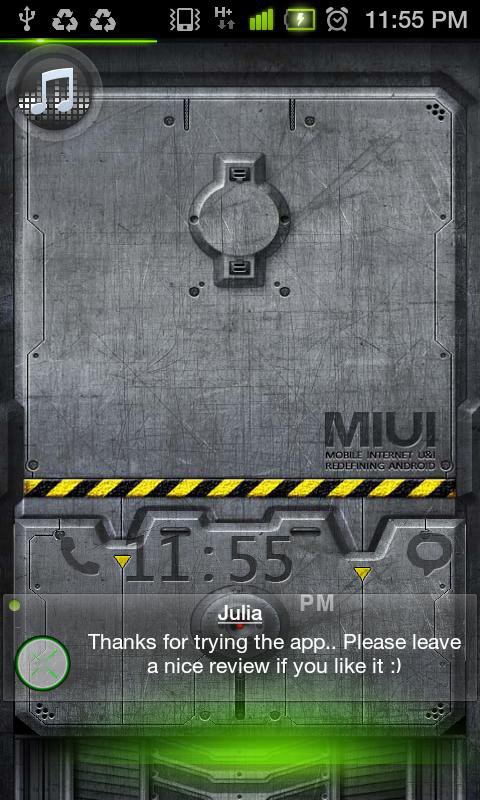
SMS Flash is a simple application that displays incoming SMS as soon as they are received, in a non interactive way. Even on lock screen (unless you are using stock lock screen). Unlike SMS popup, you can touch through the displayed SMS and continue interaction with the screen. So you do not need to stop what you were doing to read the SMS.Its very handy when you are playing Games, watching movie, recording video, taking pictures, browsing etc.
##IMPORTANT: Please read the description fully before installing and also check compatibility (in main menu) before writing reviews.
(Touch through feature has been removed from android API implementation going forward from ICS, so it works only on devices running Ginger Bread )##
#Note: No Ads, No Internet Permission, Totally Free.
SMS is formatted and notified as a transparent view on the fly, you can set the number of seconds the SMS has to be displayed and you can use Proximity sensor to
1. Dismiss SMS Flash on first touch of Proximity sensor(SMS Flash is dismissed within next 1 second after touching the sensor)
2. Extend the display time when you need more to finish reading by touching and holding
3. Go to reply box when Proximity sensor is touched twice.(#To Disable uncheck Trigger Reply Panel under Advanced Preferences#)
Tip :
$ Reply feature works best(shows chat thread) with Go SMS Pro or Handscent installed as default SMS app.
4. Easy Read feature:
-- SMS's received when screen is turned OFF will be displayed when screen is turned ON, no need to unlock, it's shown on top of lock screen unless Android default lockscreen is used.
Of course this feature can be configured based on your preference.
You can create a blacklist to make sure SMS from particular contact numbers are not displayed on the fly. You can set it as white list so that SMS from only these numbers are shown by SMS Flash.
#Attention :
1. Developed and tested on Samsung Galaxy S 2, phones with less processing power might make the SMS Flash BLINK(This is hardware limitation).
2. ##GALAXY NOTE## and few other devices might not send the touch events through SMS Flash to the underneath application, all other features work well.
Please use "Check Compatibility" feature to check before using the app.
3. %HTC sensation 4G% has Force close issue on reply feature.Please wait for a fix.
What SMS Flash is #NOT#:
% It's not replacement of your default SMS app.
% It shows SMS on the fly when screen is ON, it queues the notifications when screen is OFF and shows them once screen is ON(Enable 'Easy Read' in Advanced Preferences).
% It doesn't remove the notifications from notification bar.
Following attributes are configurable :
* Enable or disable SMS Flash (Optional password can be set)
* Text color, size and transparency
* Background color and transparency
* Contact Image transparency
* Show only Name and Contact Image or Name and Text or just Name
* Duration to display SMS
* Position to display SMS
* Whether or not you want to use proximity sensor features
* Whether or not you want to use proximity sensor to dismiss SMS Flash and ignore that SMS
* Whether or not you want to use proximity sensor to extend display duration on the fly when reading long SMS's
* Whether or not you want to trigger reply box when you double touch Proximity sensor
* Whether or not you want to trigger reply box at the end of extended display when you are close to proximity sensor
* Black listing/white listing specific numbers.
.........................................................
Special Thanks to TheSmokingAndroid for the video review.
.........................................................
Latest Version
3.3Uploaded by
Møţãž Ķhâłâf
Requires Android
Android 2.1+
Category
Free Personalization AppContent Rating
Everyone
Report
Flag as inappropriateLast updated on Sep 21, 2015
V 3.3
* Updated proximity sensor related issues with Note 2 and other tablets [Thanks to Yogesh Prasad]
* Default value of Easy Read feature changed from Enabled to Disabled
* Few minor updates and bug fixes
----
V 3.2
# Added change log alert box
# Config alert box on start up for Easy Read
# Changed default background and flash position
# Better Error Handling
# Configurable Default Locker, User Presense preferences
# Configurable Vibrate
added donate button





APKPure - A multi-platform app store primarily focused on Android, providing extensive app-related content. Discover the app you want easier, faster, and safer, with quick and efficient downloads and installations.