Scan Date:Feb 17, 2025
Show More


Samsung Smart Switch Mobile helps when you are setting up a new Galaxy phone or tablet and want to keep important content from your previous device. It is designed for people moving from many Android phones or iPhone sources to a Samsung Galaxy device. The app focuses on copying your chosen data to the new device, so the original content remains on the old phone. The Samsung Smart Switch Mobile APK can be useful when preparing a Galaxy device for everyday use.
Copy everyday phone content
Samsung Smart Switch Mobile can transfer contacts, messages, photos, videos, music, documents, notes, calendars, call logs, wallpapers, and alarms. It can also copy certain settings, including saved Wi Fi information. This helps you bring commonly used content to a new Galaxy device without manually moving each item.
Choose what to transfer
You can review the available categories before the transfer begins. This lets you leave behind unwanted files, old media, or settings that you do not need on the new device. As a result, the transfer can focus on the content you actually want to keep.
Use wireless or cable connections
Samsung Smart Switch Mobile supports direct wireless transfers through Wi Fi Direct. You can also connect the devices with a USB cable, which may be more suitable for a large photo or video library. The available method can depend on the devices and accessories you have ready.
Import supported iPhone content
You can move eligible content from an iPhone source to a Galaxy device through iCloud import. This option is intended for users who do not have both devices connected directly. You may need to sign in to the relevant iCloud account before selecting the content to import.
Keep supported Galaxy settings
When moving from one Galaxy device to another, Samsung Smart Switch Mobile can transfer supported app data and Home screen layouts. This can help retain parts of your previous Galaxy setup on the new device. Data available from non Galaxy devices may differ, so the selection screen shows what can be copied.
Samsung Smart Switch Mobile copies data instead of removing it from the old phone. Your original files normally remain in place after the transfer, which gives you time to check the new Galaxy device before deciding what to do with the old one. A Galaxy data transfer can therefore be checked category by category after setup.
The connection method matters when deciding how to transfer to Galaxy. Wireless transfer is practical when both devices are nearby and connected reliably. A USB cable can be a better choice for many large files, while a microSD card or USB OTG storage can support eligible backup based transfers.
If a wireless transfer disconnects, keep both devices close together and avoid interrupting the connection while content is being copied. For repeated interruptions or device recognition problems, try a supported USB cable connection instead. If iCloud content cannot connect, check the account sign in details and try the import again before changing the selected categories.
Samsung Smart Switch APK is intended for moving content to a Galaxy device, not for deleting or reorganizing files on the source phone. Before starting, review the categories shown in the app so you know which content is available from your particular source device.
Use Samsung Smart Switch Mobile while setting up your Galaxy device or when you are ready to copy content later. The Samsung Smart Switch Mobile latest version may show different available categories depending on the old device and transfer method. Keep both devices charged or connected to power before beginning a larger transfer.
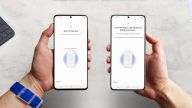
Open Samsung Smart Switch Mobile on the new Galaxy device, then choose to receive data.
On the old device, select the option to send data and choose whether the source is Android, iPhone, or supported storage.
Connect the devices through Wi Fi Direct or a USB cable, or sign in to iCloud when importing eligible iPhone content.
Review the categories displayed on the new Galaxy device, then select the files, settings, and data you want to copy.
Start the transfer and keep the connection active until the app confirms that the selected content has finished copying.
Samsung Smart Switch Mobile gives you a way to copy selected phone content and supported settings to a new Galaxy device. To download Samsung Smart Switch Mobile, check that your source device, connection method, and chosen transfer categories match your setup needs.
Official information is available from Samsung:
Latest Version
9.5.03.0Uploaded by
Samsung Electronics Co., Ltd.
Requires Android
Android 4.0+
Category
Free Tools AppContent Rating
Everyone
Security Report
Report
Flag as inappropriateLast updated on Sep 3, 2026
This release includes minor bug fixes and general improvements. Update to the latest version for the best experience.



APKPure - A multi-platform app store primarily focused on Android, providing extensive app-related content. Discover the app you want easier, faster, and safer, with quick and efficient downloads and installations.