Scan Date:Dec 12, 2024
Show More

Open one link you want to read, close the browser, find the link you want to read and open a new link.
Its iterative work. Is not it annoying?
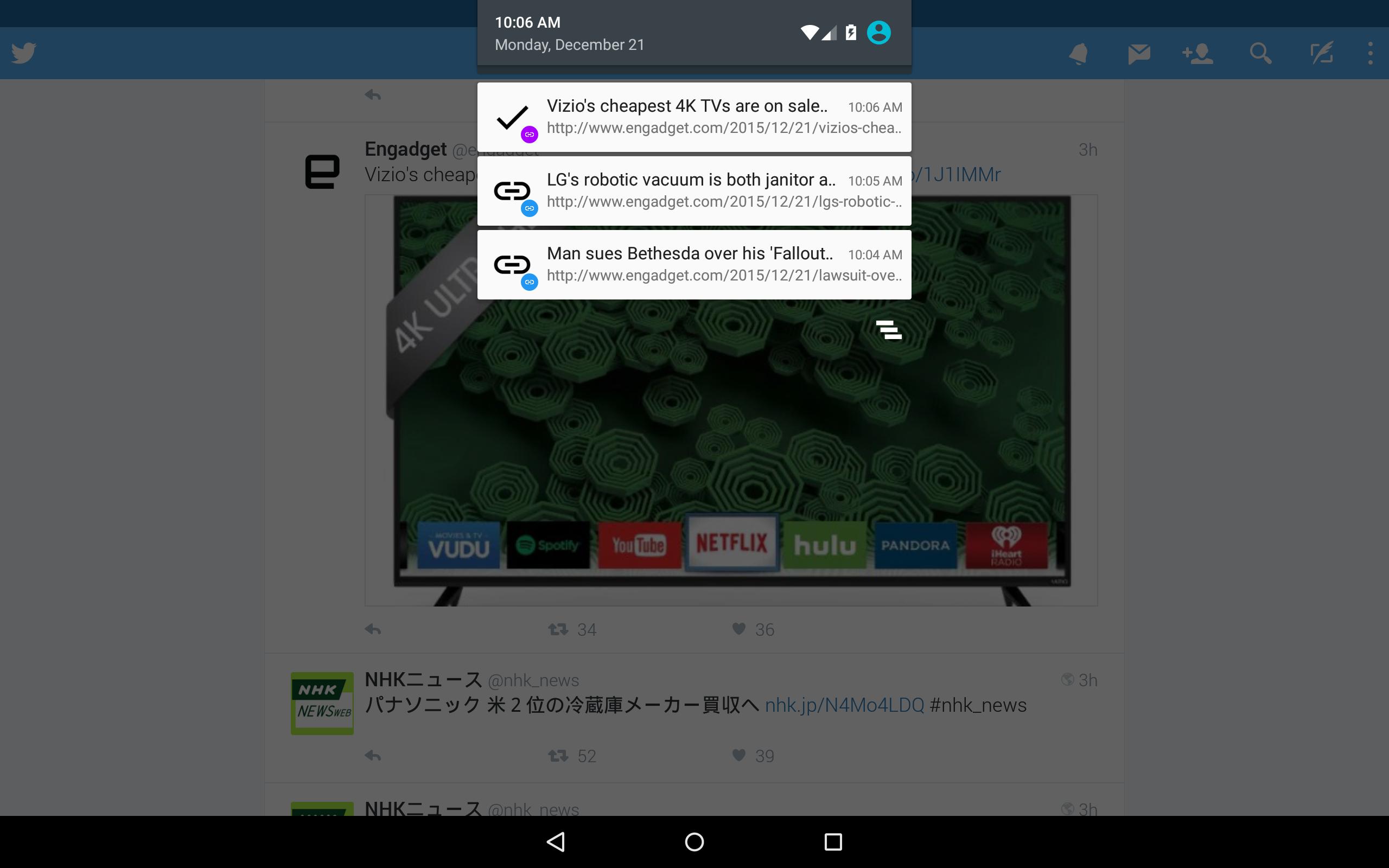
If Link Stack, you can save the link in the notification bar.
Communication saving!
From the notification, you can open the link at your own timing and read it.
Because link does not preload and so on, traffic volume is not bulky!
No matter how much you open it is safe.
Chrome level security!
It does not use its own WebView, it seamlessly works with Chrome.
We do not have to worry about logging in again or information leakage.
Read management that you can understand at a glance!
It has become possible to recognize unread read at a glance by making the link color two colors.
The unread link is blue. The read link is purple.
Since unread links do not disappear in batch deletion, unread notes will not disappear even if the notification is cleaned up. You can erase it with "close", so please be relieved.
Once the link opened from the notification is read, it becomes purple, the already read link will be deleted with batch delete, so it will not remain.
Pocket & Pushbullet Collaboration!
If Pocket and Pushbullet are included, you can work together!
I thought about reading a bit later, but you can send something that can not be read to Pocket, or use Pushbullet to move it to a PC or another device for reading.
I want to read it again. history management!
When you launch the application directly, the list of links you want to read later will be displayed in the list.
I manage history, so I can read it again later!
Of course you can delete. Let's erase what you do not want to see.
Please enjoy comfortable browsing with Link Stack.
※ Chrome version 45 or higher is mandatory.
Latest Version
2.2.0Uploaded by
Jesus Mendoza
Requires Android
Android 5.0+
Category
Free Tools AppContent Rating
Everyone
Security Report
Report
Flag as inappropriateLast updated on Aug 27, 2018
· Finished supporting under Android 5.0.
· Added the function to copy the URL of the current page.




APKPure - A multi-platform app store primarily focused on Android, providing extensive app-related content. Discover the app you want easier, faster, and safer, with quick and efficient downloads and installations.




![代謝チェッカー [基礎代謝/エクササイズ/ダイエット] APK](https://image.winudf.com/v2/image1/Y29tLnNha2Vib29rLmFuZHJvaWQubWV0YWJvbGlzbV9pY29uXzE1NjcwNDY0MzZfMDA0/icon.png?w=102&fakeurl=1)
![スマホファイター [振る/戦う/エクササイズ] APK](https://image.winudf.com/v2/image1/Y29tLnNha2Vib29rYW5kcm9pZC5kdXh5X2ljb25fMTU2NzAyMTc1M18wNjE/icon.png?w=102&fakeurl=1)

![Want it![ショッピング/買い物/管理] APK](https://image.winudf.com/v2/image/Y29tLnNha2Vib29rLmFuZHJvaWQuaW1wdWxzZWJ1eV9pY29uXzBfYzIxYTc3NzQ/icon.png?w=102&fakeurl=1)