Scan Date:Nov 1, 2019
Show More
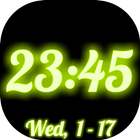
This app displays a highly customizable full screen digital clock with adjustable neon glow effect on your device. You can choose the font and date format, and have options to show seconds / date / day of the week and AM/PM marker in your device setting language. You are free to adjust the clock size, neon glow spread and color, creating the clock style you like.
It can be used as a big neon digital clock, LED digital clock, desk clock, dock clock, night clock, alarm clock with simple and minimalistic outlook.
FEATURES:
- a variety of clock text fonts:
system, cursive, calligraphic, comic,
handwritten, neon and special
- clock text style: normal / outline
- clock display adjustable:
time / date text size,
outline stroke width,
neon glow spread / brightness
- selectable date format
- options to show or hide:
date, day of the week, AM/PM marker, seconds,
battery level and power connection state
- full range neon color select
for clock text and background
- option to move clock display
to prevent screen burn in
- 4 screen modes with adjustable brightness:
standard - screen always on and follows device brightness setting
sleep - follows device sleep setting with preset brightness
normal - screen always on with preset brightness
night - screen always on with preset brightness in the dark
- support all clock orientations:
portrait / reverse portrait,
landscape / reverse landscape,
auto (follows device rotation)
- optionally launch clock on connecting to AC charger
- show / hide individual menu icon
- one touch to system alarm app
HOW TO USE:
- press setting icon to open the setting menu
- press alarm icon to go to system alarm app
- press bright screen icon to pop up the screen menu
and select standard / sleep / normal / night mode
- adjust brightness for the screen mode selected
with the seekbar
- press battery icon to check the option for
launching the clock on connecting to AC charger
- tap the screen to show all icons and date
and center the clock display
Consent form will be presented to users in EEA (European Economic Area) at the first launch to choose between personalized or non-personalized ads service, which is revisable inside the setting menu.
Latest Version
1.10Uploaded by
عمر العبيدي
Requires Android
Android 4.1+
Category
Free Tools AppContent Rating
Everyone
Security Report
Report
Flag as inappropriateLast updated on Sep 9, 2022
Version 1.10
- extend support to Android 9 devices
- change the screen mode menu to bar display
- add new screen mode: standard mode, which follows device brightness setting with screen always on, and is the default on new install
- avoid showing ads on app exit
- other minor fixes and improvements



APKPure - A multi-platform app store primarily focused on Android, providing extensive app-related content. Discover the app you want easier, faster, and safer, with quick and efficient downloads and installations.