Scan Date:Apr 16, 2021
Show More
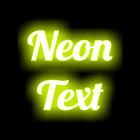
Neon Text On Photo provides a fast and easy way to draw neon text and stickers on your photo. It comes with a variety of fonts and many sets of neon styleable emoji symbols for you to choose. You can tune the neon sign effects to make your text and stickers painted and glowing in the way you want. You can zoom the picture freely, and adjust the drawing metrics by simple drag and drop. Finally, you can save your creation to the gallery and share.
CUSTOM BACKGROUND
You can choose any of your stock photo or a colored background of designated size to draw on it. The built-in image cropper lets you crop out the desired portion of photo.
EASY TEXT EDITING
Draw normal or outline text and emoji on photo with on screen editing of position, size, rotation, flipping by drag and drop. Also the menu adjustment of line spacing, outline width and alignment.
VARIETY OF FONTS
A variety of built in fonts to choose: system, cursive, calligraphic, comic, handwritten, neon and special, some with bold or italic style. You can also use Android system fonts or custom font generated from your font file.
NEON STICKERS (EMOTICONS)
Pick neon sticker to decorate your photo with on screen editing of position, size, orientation, flipping by drag and drop. You may choose solid or outline drawing with adjustable width.
MANY SETS OF STICKERS
Well designed neon styleable emoji symbols from different categories: face, emotion, food, plant, animal and some common stuff, with more to come.
CUSTOMIZABLE NEON SIGN EFFECT
Highly customizable realistic neon sign effect can be applied to text and neon stickers: full range color, glow spread, brightness and opacity adjust.
SAVE AND SHARE
Save the picture to gallery and share your creation through social media, messaging, email etc.
Consent form will be presented to users in EEA (European Economic Area) at the first launch to choose between personalized or non-personalized ads service, which is revisable in the option menu.
Latest Version
2.00Uploaded by
ธนภัทร ทิรอดรัมย์
Requires Android
Android 4.1+
Category
Free Art & Design AppContent Rating
Everyone
Security Report
Report
Flag as inappropriateLast updated on Oct 31, 2020
Version 2.00
- add background image cropper
- can use system or custom fonts
- new text/sticker added will be placed inside the background image, and copy the menu settings of last drawn
- fixed crash that may happen on saving the picture
- other minor bug fixes or improvements



APKPure - A multi-platform app store primarily focused on Android, providing extensive app-related content. Discover the app you want easier, faster, and safer, with quick and efficient downloads and installations.