
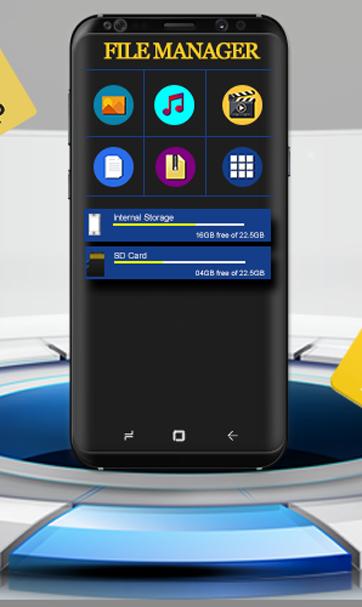
KK File Manager - File Manager for Android is an advance file browser & file explorer application for android which lets users easily explore and browser files and folders in your phone. Using this File Manager for Android you can easily manage your files and folders available in your internal and check files from external storage. KK File Manager - File Manager for Android is easy to use and designed to let users manage and explore files. KK File Manager - File Manager for Android helps users easily manage their files and folders just like they do on a desktop or a laptop. This smart, lightweight and powerful File Manager allows all file management operations easy, instant and handy in internal storage.
File Manager has a long list of features if they are written, you can compress, decompress, copy, move and delete files. You can select multiple files simultaneously and move them, copy them, cut them from one place to another. One of the best features is that it lets you explore files via categories, i.e. Images, videos documents, zip files, apps etc. are accessible in a single click. So download this KK File Manager - File Manager for Android right away. There are many upcoming features as well. This Powerful file manager has a simple UI with icons easily understandable for non-English speakers.
Main Functionalities of KK File Manager - File Manager for Android:
Built-In Image Viewer:
With File Manager App you can built-in Android functionalities which reduce app size and gives better performance to let you easily listen to music without going out to a separate app to play music. All the music files are available at one place so that you can manage your music files efficiently.
Built-In Video Player:
Play all videos in built-in video player with a single click. All the basic requirements of a video player are available. You can access these files in Videos folder and can move, copy, cut or paste them anywhere in your phone.
Built-in Compress & Decompress Files:
This File Manager comes in handy with a File Compressor. In case there is a big file that you need to keep, just compress it using the built-in file compressor and save space! Decompress file when required.
Organize and Manager Files/Folders:
In a couple of Organize Files (clicks, Move, Copy, Cut or paste your files) anywhere in your cellphone, its that easy!
Apps:
You can see all apk files available in your phone in a single folder. Instead of finding the apk files in the internal storage click and get your apk file.
Properties/Details:
You can check the details for any app. The detail includes: file size, file type, file path and name.
Internal Storage/ SD Card:
Access both internal and external storage (SD Card) rightaway.
Upcoming Features in future updates
* PC File Transfer
* Cloud Storage
* File Converter
* Recent Files
Download KK File Manager - File Manager for Android and start organizing your life by organizing you files in your phone.
Latest Version
1.3Uploaded by
Biaa Castro
Requires Android
Android 4.3+
Category
Free Tools AppContent Rating
Everyone
Report
Flag as inappropriateLast updated on Oct 20, 2019
Minor bug fixes and improvements. Install or update to the newest version to check it out!








APKPure - A multi-platform app store primarily focused on Android, providing extensive app-related content. Discover the app you want easier, faster, and safer, with quick and efficient downloads and installations.