⚠ This is a module for Icode-Go code editor (1.52+), it must be installed to launch the terminal shell:
https://play.google.com/store/apps/details?id=com.twoseventwodev.icodego
★ This module has no launcher icon when installed, it can be launched from the right slide menu in Icode-Go. ★
In order to add certain aspects to Icode-Go a terminal was required. This is an open-source (see below) terminal app that has been stripped of everything except the necessary.
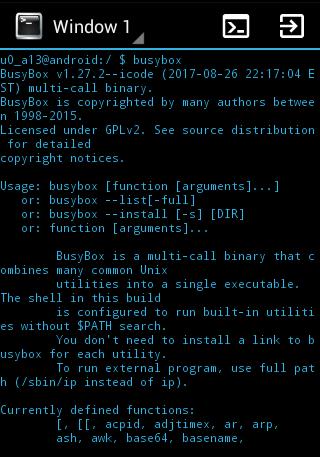
We have compiled Busybox for ARM, x86, and MIPS and it installs without root. This is not a busybox installer for rooted devices, and this busybox will only be available inside Icode-Terminal.
You can access your Android device through this emulator as you would a Linux shell.
💿 Busybox:
• Version: 1.27
• Applets: 357
💻 Terminal:
• Multiple Windows
• Lightweight, Unobtrusive
• Font size
• Text color
• Show/Hide Status and Action UI bars
• Set a folder to be used as HOME (~)
🏠Homescreen shortcut can be created from Icode-Go->Settings->Terminal Emulator->Create Shortcut
If your keyboard does not work properly inside the terminal, Hackers Keyboard is recommended for both Icode-Go Code Editor and Icode-Terminal:
https://play.google.com/store/apps/details?id=org.pocketworkstation.pckeyboard
Original Terminal by Jack Palevich:
http://github.com/jackpal/Android-Terminal-Emulator
Latest Version
1.02Uploaded by
عقيل خليف الطربوشي
Requires Android
Android 3.2+
Category
Free Tools AppContent Rating
Everyone
Report
Flag as inappropriateLast updated on Oct 4, 2017
Initial Release




APKPure - A multi-platform app store primarily focused on Android, providing extensive app-related content. Discover the app you want easier, faster, and safer, with quick and efficient downloads and installations.











