

Magic Tuner is designed for players who see stutter, frame drops, or slow response in specific games. It focuses on per game control, so each title can run with settings that match your device and play style. The app applies system level tuning to improve stability while keeping visuals in check. It also includes a simple manager to organize profiles and keep changes clear. Magic Tuner APK offers a direct way to test targeted tweaks without changing every app on the phone.
System level tuning with Game Mode API
Magic Tuner uses Android’s Game Mode API on supported devices to apply performance and graphics controls at a deeper layer. This approach targets frame pacing and responsiveness more reliably than typical one click boosters. Basic adjustments work without elevated access, while full controls become available when you grant root or Shizuku.
Rendering types and graphics modes
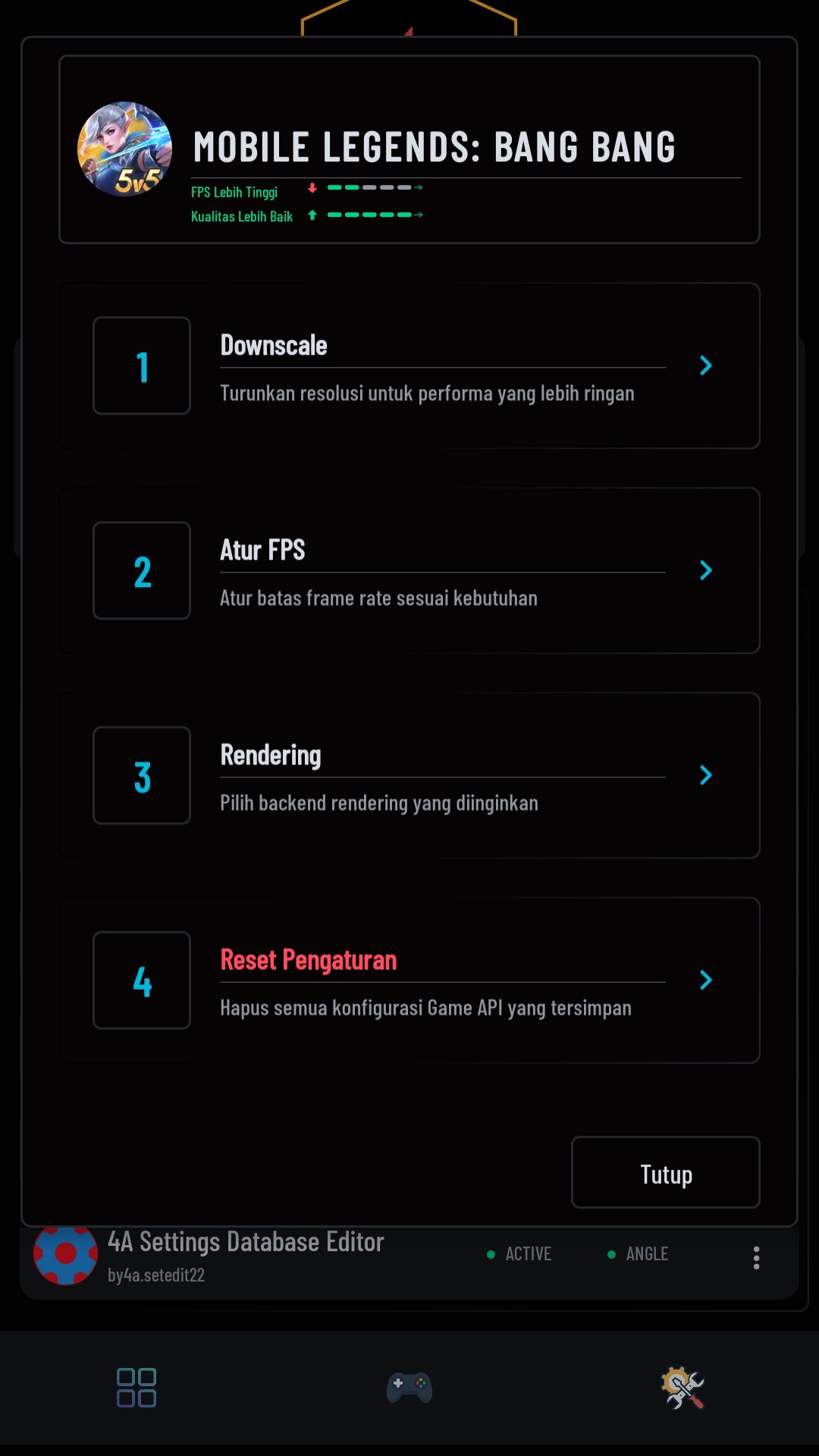
You can choose from five rendering types and four graphics modes that include High, Medium, Low, and Ultra Low. These options help balance image quality and frame rate while reducing stutter. Older hardware often benefits from lower modes, and newer devices can hold higher quality with fewer dips. Changes apply per game, so one profile does not affect another title.
Precise Game Mode adjustments
Magic Tuner lets you tune Game Mode settings per title to push performance when it matters. Competitive games can use aggressive performance targets, while story focused games can favor stability. The app then applies your selection on launch, keeping behavior consistent across sessions. This reduces the need to reconfigure options every time you play.
Optimization options for different play styles
There are three optimization options that focus on peak FPS, a balanced mix, or battery savings. You can start with a preset and refine it as you observe device temperature and frame drops. This helps keep gameplay responsive without sudden slowdowns. As conditions change, profiles can be updated quickly.
Integrated Game Manager and per title profiles
Use the Game Manager to add games, create profiles, and switch quickly when testing changes. Profiles store your rendering type, graphics mode, and optimization choice for each title. As a result, the correct settings load with the game, and you avoid manual toggling. Most popular games are compatible, and some advanced controls require root or Shizuku to take full effect.
The app indicates no data is collected or shared, and data is encrypted in transit. These practices aim to reduce exposure of personal information during regular use. Users who value privacy can adjust system permissions at any time in device settings.
Higher performance settings can increase power draw and heat, which may lead to thermal throttling over time. Battery focused profiles reduce load but can lower visual quality or limit peak FPS. A balanced approach often helps with day to day play, and switching profiles per title is straightforward. If you aim for an FPS & Lag Fix outcome, monitor temperature during longer sessions and adjust modes accordingly.
After you download Magic Tuner, set up a profile for one game to match your device and goals. The process is short and keeps changes tied to that title only. You can refine settings after a quick test run.
Open Magic Tuner, go to the Game Manager, and add a game. When prompted, grant the requested permissions so the app can manage overlays and apply settings.
If you want full controls, set up Shizuku or grant root when the app requests it. Read the on screen guidance and continue only if you are comfortable with elevated access.
Open the game’s profile, pick a rendering type, and then choose a graphics mode such as High, Medium, Low, or Ultra Low. Match these choices to your device capability and preferred frame rate.
Select an optimization option for performance, balanced play, or battery savings. Next, review the Game Mode adjustments to align with competitive or cinematic priorities.
Launch the game from within Magic Tuner to apply the profile. Play for a few minutes, check frame pacing and temperature, then return to adjust settings if needed.
Magic Tuner provides per game control over performance, graphics, and stability so you can tune settings to your needs. Profiles apply automatically and can be adjusted as conditions change. For the newest capabilities, get the Magic Tuner latest version on APKPure.
For official support or information, use the following.
Website: https://www.banglevv.com/
Email: eryalvin91@gmail.com
Latest Version
8.2.2-r260829 freeUploaded by
Lautaro Farias
Requires Android
Android 8.1+
Category
Free Tools AppContent Rating
Everyone
Report
Flag as inappropriateLast updated on Sep 10, 2026
✨ **What’s New**
• Magic Tuner can now install Magisk modules and integrate with Magisk Manager.
• Added CPU Boost to the Home menu to increase CPU clock speed when enabled.
• General stability improvements and bug fixes.




APKPure - A multi-platform app store primarily focused on Android, providing extensive app-related content. Discover the app you want easier, faster, and safer, with quick and efficient downloads and installations.







