DOO Gamepad - Simply make up a touch dummy controller
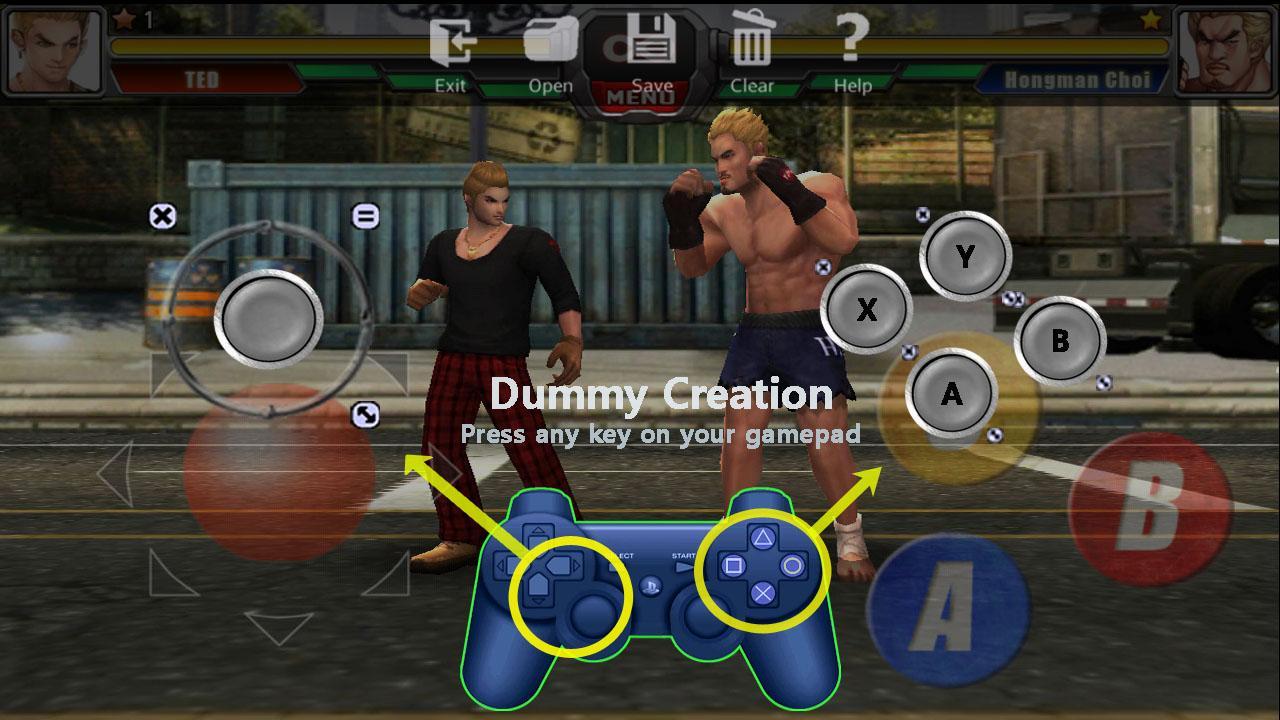
After connecting your gamepad or input device to android device, Press any buttons of connected controller in the mapping mode to create dummy controller and adjust the created dummies to your game.
Important : this service requires root.
■ Simple and intuitive Interface
Easy creation of dummy controllers
Intuitive adjustment of dummy controllers & sensitivity
Easy Profile save & open
■ Game control
- Joysticks : moving control & sensitivity
( usually used as Object moving or View moving controller )
- Other keys : touch button
( defined by user need )
■ Some devices may not be supported.
Latest Version
1.3.0Uploaded by
Jay Kays
Requires Android
Android 4.4+
Category
Free Tools AppContent Rating
Everyone
Report
Flag as inappropriateLast updated on May 1, 2017
Improve UI & Settings Menu



APKPure - A multi-platform app store primarily focused on Android, providing extensive app-related content. Discover the app you want easier, faster, and safer, with quick and efficient downloads and installations.