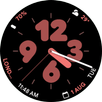
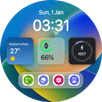
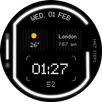
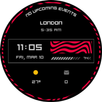
Digital Material You 3 is made for users who want their smartwatch to look closer to their Android phone style. It focuses on a clean digital watch face with soft colors, rounded visual elements, and a layout that feels familiar on the wrist. Because it is a paid Wear OS watch face, users should check whether the design and customization options match their daily needs before choosing to download Digital Material You 3.
Material You inspired watch design
Digital Material You 3 uses organic shapes, soft pastel colors, and a simple digital layout to create a watch face with a Material You look. The design is meant for users who prefer a calm smartwatch screen instead of a busy display. As a result, the clock and main information stay easy to view during daily use.
Customizable complications
Digital Material You 3 includes 4 customizable complications, giving you quick access to useful watch information and shortcuts. Depending on your watch setup, these areas can help show data you often check, such as activity, weather, calendar, or other supported watch functions. This makes the watch face more practical without changing its main visual style.
Always on display complication
Digital Material You 3 also provides 1 independent AOD complication for the always on display. This lets you keep a selected piece of information visible when the watch is in its low power display state. For users who often glance at the wrist without fully waking the screen, this can make the watch face more useful.
Color and font choices
You can adjust the look with 12 color options and 2 clock fonts. These choices help match the watch face with different straps, phone themes, or personal color preferences. In addition, the limited number of options keeps customization simple, so users do not need to spend much time setting it up.
Battery progress bar
Digital Material You 3 includes a battery progress bar that shows the watch battery status in a clear visual way. Instead of checking a small number or opening another screen, you can see the battery level at a glance. This is useful during work, travel, or exercise when quick checking matters.
Digital Material You 3 is a paid Wear OS watch face, so it is mainly useful for users who already own a compatible Wear OS smartwatch and want a visual refresh. The app does not describe itself as a fitness tracker, launcher, or standalone smartwatch tool. Its main purpose is to change the watch face appearance and provide selected watch data through complications.
For Galaxy Watch users, setup may involve the companion app or Galaxy Wearable, depending on the watch and phone connection. This matters because watch faces sometimes need to be applied from the watch management screen rather than opened like a normal phone app. Before getting the Digital Material You 3 APK, users should understand that the phone app may act as a setup bridge for the watch face.
Digital Material You 3 works as a smartwatch watch face, so the main setup happens after the app is available on your connected watch. If you install the Digital Material You 3 latest version, follow the normal watch face selection flow on your Android phone or watch.
Digital Material You 3 is a paid Wear OS watch face for users who want a clean Material You inspired smartwatch screen with pastel styling, customizable complications, and battery status at a glance. Users can choose the Digital Material You 3 APK when they want to set up this watch face on a supported Android smartwatch.
Latest Version
Varies with deviceRequires Android
Category
Personalization AppContent Rating
Everyone
Report
Flag as inappropriateLast updated on Oct 12, 2025
This release includes minor bug fixes and general improvements. Update to the latest version for the best experience.



APKPure - A multi-platform app store primarily focused on Android, providing extensive app-related content. Discover the app you want easier, faster, and safer, with quick and efficient downloads and installations.