Installation:
1. Make sure you watch is connected to your phone via Bluetooth.
2. Install, download and open the companion app.
3. Go to the watch Play Store, and type the exact watch name(with correct spelling and spacing) and open listing. If price still appears, wait for 2-5 minutes or restart your watch face.
4. Please also try installing the watch face via Galaxy Wearable app(install it if not installed)> Watch Faces> Downloaded and apply it to watch.
5. You can also install this watch face by accessing the Google Play Store in the web browser in a PC or Laptop. Make sure you use the same account you made the purchase from to avoid double charge.
6. If PC/laptop not available, you can use the phone web browser. Head over to the Play Store app, then to the watch face. Click the 3 dots in the upper right hand corner then Share. Use the available browser, login to the account you made the purchase from and install it there.
About the watch face:
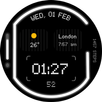
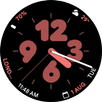
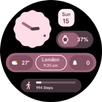
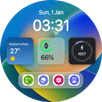
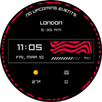
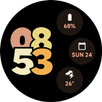
A simple, minimalist analog watch face for your Wear OS watch.
The Watch face:
1) Features a Red tint before 12 noon
2) Features a Blue tint after 12 noon
3) Features a Green tint while Charging
The watch face also highlights the current hour.
With a predominantly black interface, the watch face is light on your battery as well..
Latest Version
Varies with deviceRequires Android
Category
Personalization AppContent Rating
Everyone
Report
Flag as inappropriateLast updated on Oct 12, 2025
Minor bug fixes and improvements. Install or update to the newest version to check it out!



APKPure - A multi-platform app store primarily focused on Android, providing extensive app-related content. Discover the app you want easier, faster, and safer, with quick and efficient downloads and installations.