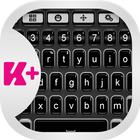
Are you ready to change your day? With this amazing theme, your day will be awesome and different. This Dark Keyboard theme has a very nice design, and you will love the way that this theme is elegant and perfect for you. Be professional and make the smart choice by choosing the Dark Keyboard theme. Don't hesitate and download right now the Dark Keyboard theme, you will love it.
How to install a Keyboard Plus theme?
Just follow these easy steps:
1. Download Dark Keyboard from Google Play Store
2. Open the Dark Keyboard theme
3. Apply the theme by pressing the - Activate - button from the Keyboard Plus Theme Manager
If you want to change your font size just go to the Quick Settings Tab and choose from one of the 3 available sizes: small, medium or large.
Latest Version
3.0.55Uploaded by
Hadiirwandi Irwandi
Requires Android
Android 4.2+
Category
Free Personalization AppContent Rating
Everyone
Report
Flag as inappropriateLast updated on Jul 17, 2018
This release includes minor bug fixes and general improvements. Update to the latest version for the best experience.









APKPure - A multi-platform app store primarily focused on Android, providing extensive app-related content. Discover the app you want easier, faster, and safer, with quick and efficient downloads and installations.














