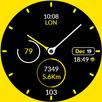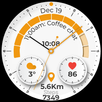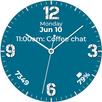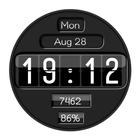
This watch face is designed for Wear OS. Aircraft Jet engine style watch.
Inspiration from Jet engine - Boeing - Airbus - Embraer.... Airplane style watch.
This watch face is designed for Wear OS
★ Features:
• Time
• 3 Complications (editable places)
• Day & Date
• Steps
• Battery status
★ INSTALLATION NOTES:
You have to select your watch device from the install drop-down menu.
Select the target device in the Play Store app from the drop-down and tap on install. Download status will appear on watch, install and then select (activate) watch face. This way is preferred, if you have a problem, you can install it in two other ways, listed under, via phone companion app or web browser.
1. Make sure the watch is properly connected to the phone, open the Phone App on the phone and tap on "Tap to continue" and follow instructions on watch.
After a few minutes, the watch face will be installed. You can choose the installed watch face.
App downloaded to your phone serves only as a placeholder to make it easier to install & find the watch face on your Wear OS watch.
or
2. Alternatively, try installing the watch face from a web browser on your PC.
- Open watch face link in a web browser (Chrome, Firefox, Safari...)
on PC or Mac.
This Link:
https://play.google.com/store/apps/details?id=com.caveclub.aviation
You can search for the watch face in
play.google.com or share a link from the Play Store app.
- Click 'Install on more devices' and select your watch. You must be logged with the same Google Account.
// LOOP Note //
If you're stuck at the payment loop (Play Store asks you to pay again), this could be a sync problem between your watch and Google Play server. You can try disconnecting / reconnecting the watch from your phone and try again. To do this quickly, set the "Airplane mode" on watch for 10 seconds. Please see "Note before purchasing" and "Installation Notes".
Note before purchasing:
You don't have to worry , Google can charge you only one time for the content purchased from the same Google (Play Store) Account.
Sometimes the Play Store takes a little longer to confirm that you already bought the face watch app. Any additional order will be automatically refunded by Google, you will receive the money back.
There is no way to pay twice for the same watch face.
Cave Club
Latest Version
Varies with deviceRequires Android
Category
Personalization AppContent Rating
Everyone
Report
Flag as inappropriateLast updated on Apr 17, 2026
Minor bug fixes and improvements. Install or update to the newest version to check it out!




APKPure - A multi-platform app store primarily focused on Android, providing extensive app-related content. Discover the app you want easier, faster, and safer, with quick and efficient downloads and installations.