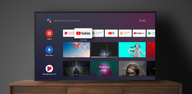

Android TV Home is the official Google launcher for Android TV devices. It serves as the central hub where you open apps, browse channels, and see helpful recommendations in a TV friendly layout. The interface is built for remote controls, so navigation is simple and focused on what to watch next, which helps you get to your shows, live TV, and games with fewer clicks.
Content first home screen
Android TV Home places channels and rows at the center of the experience so fresh picks and Continue Watching are easy to find. This layout moves content forward and reduces time spent searching.
Quick access to top apps
You get a clean TV interface that places key apps and inputs within easy reach. In addition, you can jump back to recently used apps and sources without drilling through menus.
Assistant voice search and control
Android TV Home works with the microphone on your remote so you can search for titles, actors, and genres by voice. Moreover, you can ask for info and control compatible smart home devices without leaving the screen.
Customizable layout
You can reorder or hide channels and pin favorite apps to shape a home screen that fits your viewing habits. As a result, the most used rows stay visible while less useful ones stay out of the way.
Remote friendly navigation
Every screen is optimized for directional pad input and clear focus states. Therefore, moving across rows, opening details, and launching content remains consistent from one app section to the next.
Works with casting
Android TV Home recognizes content sent from your phone or tablet so you can start playback on the big screen. In addition, deep links open shows in their installed apps when available.
Android TV Home is the launcher for devices running Android TV, while Google TV Home is used on devices that run Google TV. Both are made by Google, yet their interfaces and features differ to match each platform. If your device uses Android TV, download Android TV Home to manage the home screen and recommendations designed for that environment.
Feature availability and preloads can vary by country and by device manufacturer. A Google Account may be required for personalized recommendations, Assistant responses, casting features, and purchases inside partner apps. Also, some streaming services require separate subscriptions before they will appear in channels or open from the home screen.
Voice search and helpful answers come from the built in Assistant that works with your remote. Casting lets you start videos or music from a phone to your TV when the app supports it on both devices. This ecosystem approach helps Android TV Home act as a familiar Android TV launcher across many living rooms.
This quick guide explains the basics so you can set up and use the home screen efficiently. Follow the steps to customize your rows, control by voice, and keep your top apps one click away.
Android TV Home keeps your TV organized with a simple, content forward home screen and remote friendly controls. Get the Android TV Home APK latest version on APKPure to install or update with confidence. When you are ready, download Android TV Home and start tailoring your channels and favorites in minutes.
For official product information, visit:
What is the Android TV Home app?
Android TV Home is the official launcher that controls the home screen on Android TV devices, showing apps, channels, and recommendations. It acts as your Android TV launcher so you can open content quickly and manage what appears on your TV.
Which app is best for Android TV?
For the home screen experience on Android TV, Android TV Home is the default Google launcher built for TV remotes and large screens. It is designed to organize apps and help you continue watching without extra steps.
What is the home app on Android?
On phones, the home app is a mobile launcher. On TVs, Android TV Home is the launcher that powers the Android TV interface, which is different from a phone launcher and optimized for remote navigation.
Can I install Google Home on my Android TV?
The Google Home app runs on phones and tablets to manage devices, while Android TV Home manages the TV home screen. If you need to update or install the TV launcher, get the Android TV Home APK latest version on APKPure and use that on your Android TV device.
Do I need a Google Account for Android TV Home features?
A Google Account may be required for personalized recommendations, Assistant results, and casting related features in Android TV Home. Some partner apps also need sign in and separate subscriptions before their channels and content appear on the home screen.
Latest Version
7.7.15-968255986-fUploaded by
Farel
Requires Android
Android 8.0+
Category
Free Tools AppContent Rating
Everyone
Report
Flag as inappropriateLast updated on Sep 1, 2026
This release contains performance improvements and visual design updates.



APKPure - A multi-platform app store primarily focused on Android, providing extensive app-related content. Discover the app you want easier, faster, and safer, with quick and efficient downloads and installations.