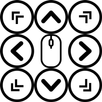
Can be used when clicking with only one hand.
Using the keys allows you to click without dragging.
You can change the keys in various ways.
Important:
Accessibility Services: The Accessibility Services permission is required to allow users to simulate clicking and scrolling the screen based on user selection. This application does not use accessibility to access or read user data.
Download Windows 10: https://mega.nz/file/2hl2UZwY#9qXqQuEIqKWTIgObJCwOuMI3vADw_uD51cdm-WuFbiI
When using a tablet with a large screen or a smartphone with one hand, you can click all the way to the corner with the keys.
Mouse key allows you to move the cursor by pressing a key.
The gliding cursor is clickable with precision and can be clicked via sound.
manual:
1: Click the second line permission and click OK. You need to find the app in the permission settings and allow it to be able to click the keys.
2: Click the Advanced Features button on the 6th line. Of the keys types, the voice clicks with sound and the gliding cursor can be fine-tuned using a moving bar. The mousekeys can move the cursor precisely.
3: Long click option If you press and hold the keys for more than 1 second, the drawing mode is activated, and if you press and hold for a longer time, it can be hidden.
4: Auto-click allows you to click after a few seconds after the cursor moves and stops.
5: Clicking one button moves only the cursor, which is useful when giving a lecture.
6: There are other decoration options, such as changing the keys color and changing the image. You can turn the keys on and off through the widget, and you can also turn it on and off from the notification bar.
Latest Version
1.22Uploaded by
Arsen Sinduykov
Requires Android
Android 9.0+
Category
Free Tools AppContent Rating
Everyone
Report
Flag as inappropriateLast updated on Jun 12, 2025
A bug that caused the app to be forced to close due to duplicate foreground services being created after an update has been fixed.




APKPure - A multi-platform app store primarily focused on Android, providing extensive app-related content. Discover the app you want easier, faster, and safer, with quick and efficient downloads and installations.