
Developed by ColorOS and HeyTap for OPPO and realme, Game Space brings your entire gaming catalog together and prepares your device for smoother sessions. It provides one tap controls for performance settings, automatic optimization when a game launches, and tools to keep distractions low while you play. You can also get the Game Space APK latest version on APKPure to access improvements quickly, and you can explore community options for tips and feedback. Therefore, if you want a simple way to organize titles and improve stability, download Game Space to manage it all in one place.
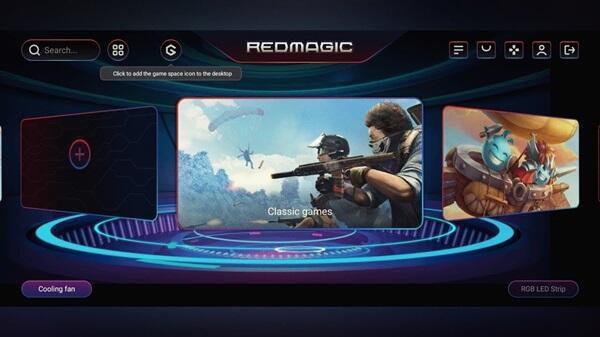
Unified game launcher
Game Space automatically detects installed titles and places them in a single library. This reduces the time you spend searching across folders. As a result, you can launch games faster from one screen.
Automatic Gaming Mode
It applies a focused mode when you start a game. It adjusts performance options and helps limit interruptions. Therefore, you can keep your attention on the match with fewer pop-ups.
Network acceleration
Game Space offers VPN based acceleration for online play. It evaluates latency, network type, quality, and approximate location to choose routes that may reduce lag. Moreover, you can toggle it when needed to stabilize your connection.
In-game tools
Game Space provides quick controls while you play. You can adjust settings, review performance options, and manage notifications without leaving your session. In addition, this keeps the setup simple between matches.
Community engagement
There is a space to view tips and share feedback with other players in Game Space. You can read quick suggestions and post thoughts about features. Also, it helps you stay informed about updates and best practices.
Smart discovery
Game Space suggests new games based on your interests and play history. Suggestions appear inside the hub, so you do not need to browse multiple sources. Finally, you can find ideas for your next game from one location.
When you enable Network Acceleration, Game Space uses a VPN to analyze your connection for gaming traffic. It collects latency, network type, network quality, and approximate location to select routes that can improve speed. Data is encrypted during transfer and is not shared with third parties, and you can turn the feature off at any time. For details, see the official ColorOS or HeyTap privacy policy.
Features in Game Space can vary by device model, region, and software version of ColorOS or realme UI. Some functions requested by users, such as a voice changer, might not appear on every model. If a menu or toggle is missing on your phone, it may not be supported for your region or firmware version. Therefore, check your device updates and the app version to see available options.
This quick guide explains the basic setup so you can start gaming with fewer distractions. Follow these steps to organize your titles, configure performance, and stabilize your network when needed.
Download Game Space APK from APKPure and install it on your device, then open the app to start setup.
Grant the requested permissions so Game Space can detect and display your installed games, then review the library it creates.
Then open any game from Game Space to enable Gaming Mode automatically, and check the controls to limit notifications or calls while playing.
Open the Network Acceleration option inside Game Space, turn it on for online titles, and review the connection status to see if latency improves.
After that, explore the in-game tools for quick settings, and visit the community section to read tips or share feedback about features you use most.
Game Space helps organize your games, cut down on interruptions, and improve online stability with optional acceleration. Download Game Space APK latest version on APKPure to keep features and fixes up to date, and launch your games from one hub.
Is Game Space available for realme devices?
Yes, Game Space is made by ColorOS and HeyTap for both OPPO and realme devices. The exact features you see can vary by model, region, and realme UI version. If something is missing, your device or firmware may not support that option.
Does Game Space use a VPN for acceleration?
Yes, Game Space uses a VPN for its Network Acceleration feature. It measures latency, network type, quality, and approximate location to choose routes that may improve stability. Data is encrypted during transfer and not shared with third parties, and you can disable the option at any time.
Latest Version
1.2.07_0429Uploaded by
Game Space Red Magic
Requires Android
Android 7.0+
Available on
Game Space Red Magic
Category
Free Tools AppReport
Flag as inappropriateLast updated on Jul 12, 2024
Minor bug fixes and improvements. Install or update to the newest version to check it out!




APKPure - A multi-platform app store primarily focused on Android, providing extensive app-related content. Discover the app you want easier, faster, and safer, with quick and efficient downloads and installations.