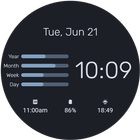
Yearly Progress Watch brings style and functionality to your Wear OS smartwatch with a customizable watch face.
Key Features:
- Customizable Design: Choose your preferred style from a variety of themes, colors, and fonts.
- Always-On Display Support: Check the time anytime with a battery-efficient always-on display mode.
- Three Complication Slots: Personalize your watch face with three customizable complication slots. Examples of what you can display include:
- Interactive Features: Tap to access detailed information or quick access to apps.
- Fitness Data Display: View real-time stats like steps, heart rate, and calories burned.
- Weather Integration: Check current weather and forecasts right on your watch face.
- And more! Choose from a variety of other functions to suit your needs.
How to Use:
- Download and install Yearly Progress Watch.
- Long-press on your watch face and select Yearly Progress Watch from the list.
- Customize as desired through the settings menu.
Support:
- If you have any questions or feedback, please feel free to contact us.
Note:
- This app works with Wear OS 2.0 and above.
- Some features require pairing your smartwatch with your smartphone.
Personalize your smartwatch with Yearly Progress Watch today!
Latest Version
1.0.0Requires Android
11
Category
Personalization AppContent Rating
Everyone
Report
Flag as inappropriateLast updated on Sep 22, 2024
Minor bug fixes and improvements. Install or update to the newest version to check it out!




APKPure - A multi-platform app store primarily focused on Android, providing extensive app-related content. Discover the app you want easier, faster, and safer, with quick and efficient downloads and installations.














