Package Name:com.axe.player
SHA-256:25b5a1b28d78af3b63ea486e69ca4d78da411967c0991338c0cee5a5d65e01ef
Show More

X Player is a fast, all-in-one video and audio player built for smooth playback and deep customization, without the clutter. Whether you are watching downloaded videos, streaming from a network link, or listening to your music library, X Player adapts to how you actually use your phone.
SMOOTH VIDEO PLAYBACK
• Plays all popular formats including MP4, MKV, AVI, FLV, WMV, and more
• Hardware-accelerated decoding, even on older devices
• Background audio listening keeps sound playing when you switch apps
• Picture-in-Picture mode, resume-from-last-position, and night mode for low-light viewing
• Adjustable playback speed and pitch, pinch-to-zoom, flip, rotate, and fit, stretch, or crop scaling
LIVE VIDEO FILTERS
• Apply real-time visual filters while your video plays, including Sepia, Grayscale, Monochrome, Invert, Vignette, Sharpen, and dozens more
• Preview and switch between over 30 filters from a simple picker, and turn them off anytime
30+ NOW PLAYING SCREENS
• Give your music player a whole new look with 30 Now Playing screen styles, including Vinyl, Cassette in four deck colors, Card, Circle, Blur, Peek, Material, and MD3
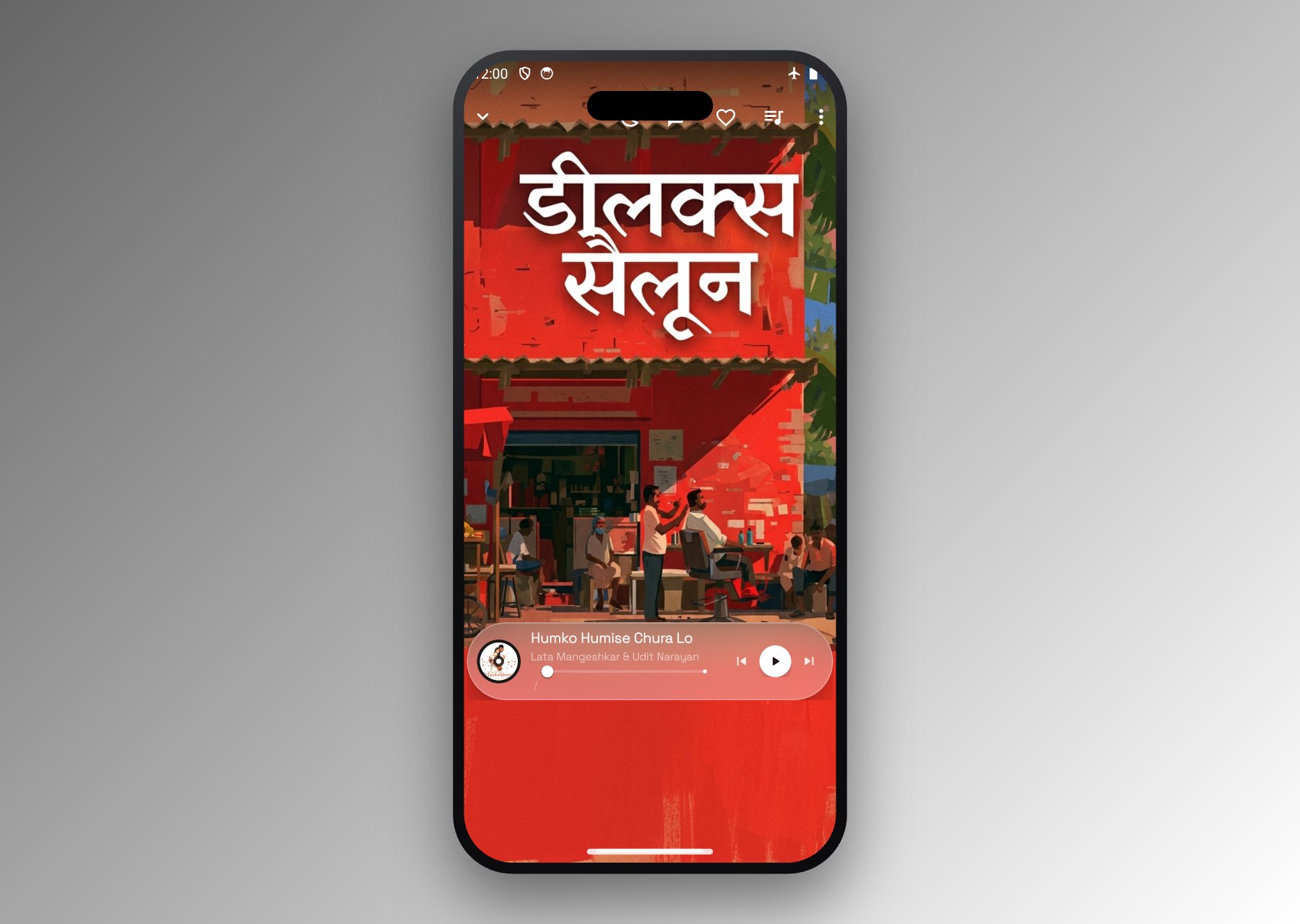
• Novelty styles like ASCII Art, Lego, Truck Wala, and Deluxe Saloon for something different
• Six album cover shapes, eight cover-change animations, an optional snowfall effect, and swipe-anywhere to change songs
BUILT-IN EQUALIZER AND SOUND
• Five-band graphic equalizer with dedicated Bass and 3D controls, plus ready-made presets
• Crossfade and gapless playback between tracks
• Smart pause and resume on headset unplug, with Bluetooth-aware playback
GESTURE CONTROLS
• Swipe up or down to adjust volume and brightness on the video screen
• Swipe left or right to seek forward or backward through playback
• Double-tap to seek, pinch to zoom, and lock the screen while watching
SUBTITLES AND AUDIO TRACKS
• Load subtitles and customize their color, background, and size
• Switch between multiple audio tracks within a single file
• Stream video directly from a network URL
PERSONALIZE EVERY DETAIL
• Six app-wide looks: Material, Wallpaper, Liquid Glass, and three Gradient styles
• Light, Dark, or Follow-system theme, with Material You dynamic color
• 64 preset accent colors, or pick any custom color you like
• Seven font families with adjustable style and text scale
• A floating docked bottom bar or a classic bottom navigation
SETTINGS FOR EVERY DETAIL
• Choose which library tabs appear and in what order, from Home, Songs, Albums, Artists, Playlists, Genres, and Folders
• Sort your library by title, artist, album, year, duration, date added, and more
• Customize notification style, lock screen controls and artwork, and grid layouts for artists and albums
• Blacklist folders you do not want scanned, and filter out short clips by length
• Back up and restore your settings and playlists anytime
• Available in 39 languages, or match your system language automatically
ORGANIZE YOUR LIBRARY
• Browse videos by folder or playlist, and music by songs, albums, artists, and genres
• Create and manage your own custom playlists
• Mark favorites and multi-select to share, delete, or organize several files at once
• Pick up recently played content from the For You tab
EXTRA CONVENIENCE
• Sleep timer with a "finish current song" option
• Take snapshots of any video frame
• Cast supported content to other devices
• Detailed file info including resolution, format, duration, size, and location
X Player is built to feel fast and stay out of your way, with the controls you need close at hand and the customization to make it truly your own.
Download X Player and enjoy your videos and music exactly the way you want.
Latest Version
1.0.21Uploaded by
Thiago Sérgio Roza
Requires Android
Android 5.0+
Category
Free Video Players & Editors AppContent Rating
Everyone
Security Report
Check Now
Report
Flag as inappropriateLast updated on Oct 16, 2026
This release includes minor bug fixes and general improvements. Update to the latest version for the best experience.





APKPure - A multi-platform app store primarily focused on Android, providing extensive app-related content. Discover the app you want easier, faster, and safer, with quick and efficient downloads and installations.