Package Name:com.gyokovsolutions.videoboard
SHA-256:00674821ffa9feee8d6c60e1109c78d290aca0619d72395f3e5681c8d25a9757
Show More

Video Board is a video board app for easy playing videos and pictures from different sources. You can play whole videos or just part of them. The videos could be:
- video, audio or image files from your device storage
- online video files using direct link URL
- YouTube
- other online video sharing platforms using their embedding option
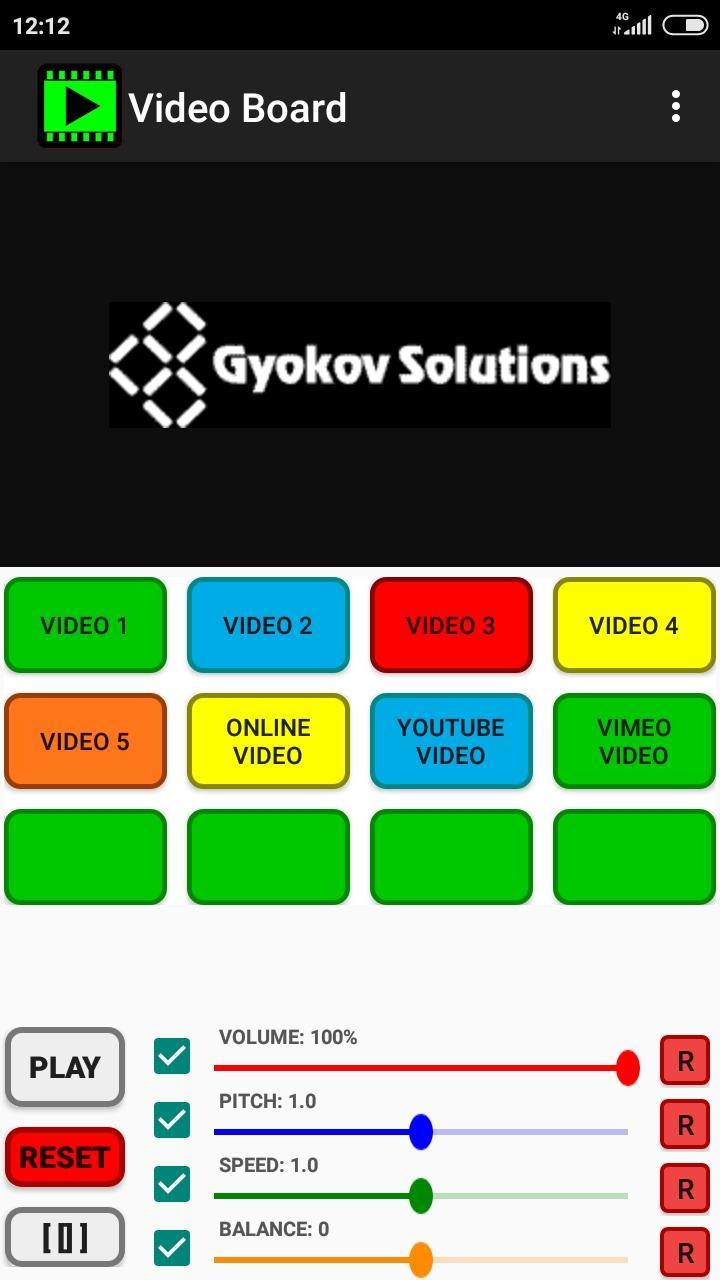
You can create your own unique video board. There are different types of buttons for different playing options and you can control volume, speed, pitch and balance. Also file cropping and fade in/out is possible.
The app can be used for different purposes like:
- educational - musical instrument playing or language learning - assign different video clips to different buttons (or split one big clip to several clips using cropping) and easily access them on button click. Change speed and pitch to match your purposes.
- creating multi layer collages of videos, pictures and animated gif images
- fun - assign videos for different buttons and have fun playing them on different occasions.
App features:
- play custom video and picture files from your device storage or online videos from youtube, vimeo and other online platforms
- use different types of play (loop, start/stop on press etc...)
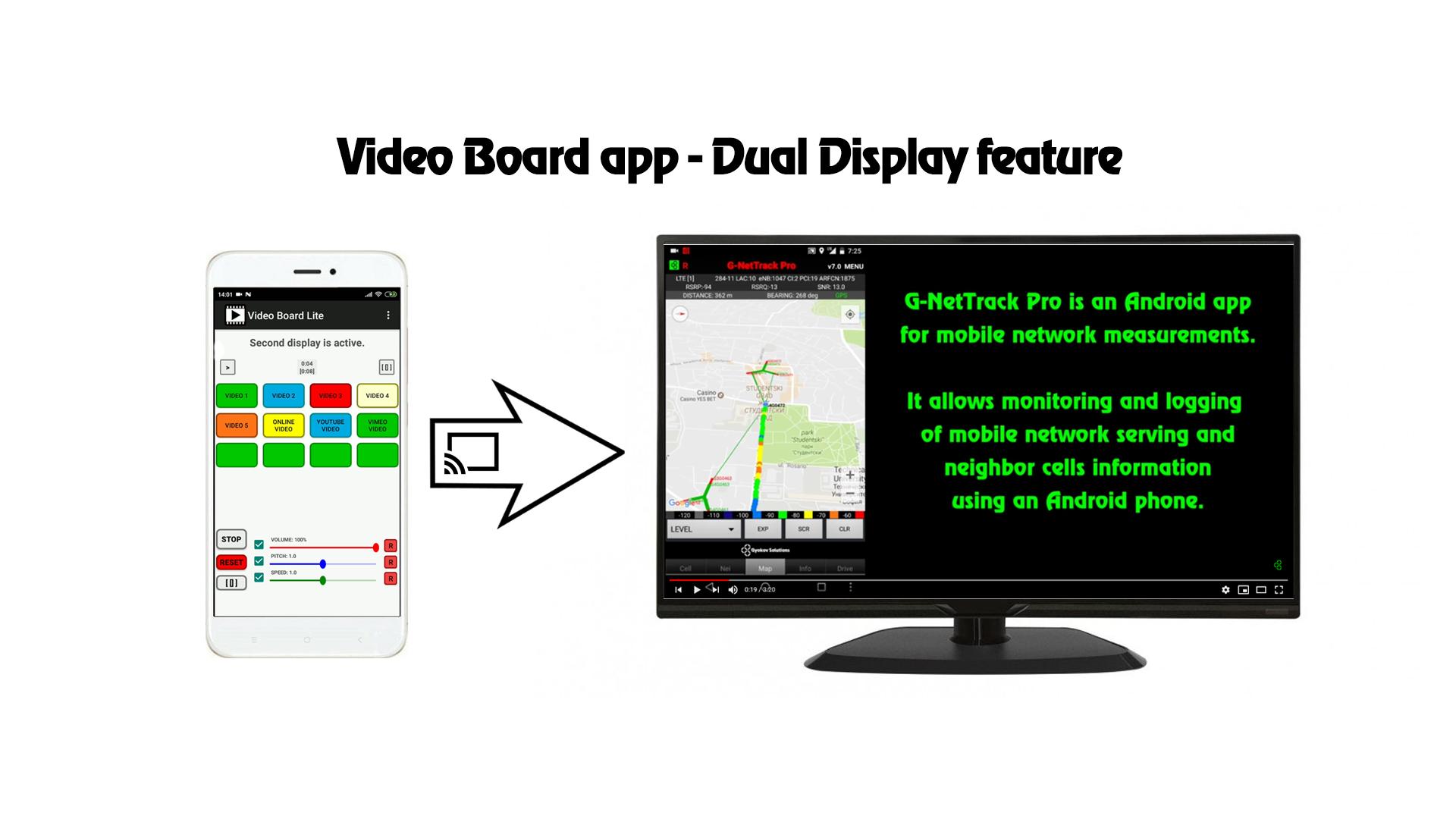
- dual display - show videos on TV or another screen
- multi layer image and videos - show picture and videos over videos
- adjust individual video volume, balance, pitch and speed
- face recognition and automatic face matching of face image over background face image or video
- use cropping
- fade in/out for video
- command buttons for playing several buttons simultaneously
- load text script files for automation
- custom number of buttons
- control volume, pitch and speed
- control brightness and RGB colors
- export and import button configurations
- ping pong effect
Demo app video - https://youtu.be/fHGx4bjXX3s
Dual display feature video - https://youtu.be/TdGue-2vDjE
Multilayer image feature - https://youtu.be/nKACT2Go_uM
How to change the sounds:
- Go to Menu and turn EDIT MODE on
- press a button go to button settings
- select file location or input video source URL for online videos
- adjust volume and balance for the sound
- you can use file cropping by enabling it and selecting start and end times
- Exit the EDIT MODE (Menu - EDIT MODE)
Button types:
TYPE1: Green
- On Click - Plays the file
TYPE2: Blue
- On Click - Plays the file
- On second click - stops playing
TYPE3: Red
- On Click - Plays the file
- On release - stops playing
TYPE4: Yellow
- On Click - Plays the file loop
- On second click - stops playing
TYPE5: Orange
- On Click - Plays the file
- On next click - pauses playing
- On next click - resumes playing
Supported file formats - https://developer.android.com/guide/topics/media/media-formats.html
BUTTON SETTINGS in EDIT MODE
- Button Type - select button type for different playing behavior
- Select File - select file from files on your device.
- Button Name - select button name.
- Volume - set volume
- Balance - set balance (left - right)
- Pitch - set pitch.
- Speed - set speed.
- File Crop - set start and end position timing.
- Fade - set fade in and fade out time.
TIME INTERVAL SETTINGS
General time format is:
HOURS:MINUTES:SECONDS.MILLISECONDS
For all time intervals you can fill values in format like:
- SECONDS.MILLISECONDS - example - 20.128 means 20 seconds and 128 milliseconds
- MINUTES:SECONDS.MILLISECONDS - 10:25.424 means 10 minutes, 25 seconds and 424 milliseconds
- HOUR:MINUTES:SECONDS.MILLISECONDS - 1:10:20.024 means 1 hour, 10 minutes, 20 seconds and 24 milliseconds
CONTROLS
Volume, pitch and speed controls are for current active video. Pitch and speed controls require Android version 6 or higher.
Brightness, Red, Green and Blue controls are for current active image.
App manual - http://www.gyokovsolutions.com/manuals/videoboard_manual.php
App privacy policy - https://sites.google.com/view/gyokovsolutions/video-board-privacy-policy
Latest Version
28.3Uploaded by
Cheng Yat Kit Joshua
Requires Android
6.0
Category
Video Players & Editors AppContent Rating
Everyone
Security Report
Check Now
Report
Flag as inappropriateLast updated on Aug 5, 2020
Video Board - is a videoboard app for easy playing videos from different sources. You can play whole videos or just part of them.The videos could be:
- video, audio or image files from your device storage
- online video files using direct link URL
- YouTube
- other online video sharing platforms using their embedding option
Dual display is available - play videos on TV or another screen.




APKPure - A multi-platform app store primarily focused on Android, providing extensive app-related content. Discover the app you want easier, faster, and safer, with quick and efficient downloads and installations.