Let's download the custom file manager 2017 free!
new looks for phone manager with Grid layouts. It means you can set as photo in grid, video grid etc.
just need to command on file manager and manage all the media files securely with new design.
file management is most tricky part in smart phone but if you like file manager app which can manage good way and make your life easy with
any file operation with instant refresh media storage based on phone partition. manage folders wise, files wise etc.
speed operation for manage files.
File Manager App for android google play store.
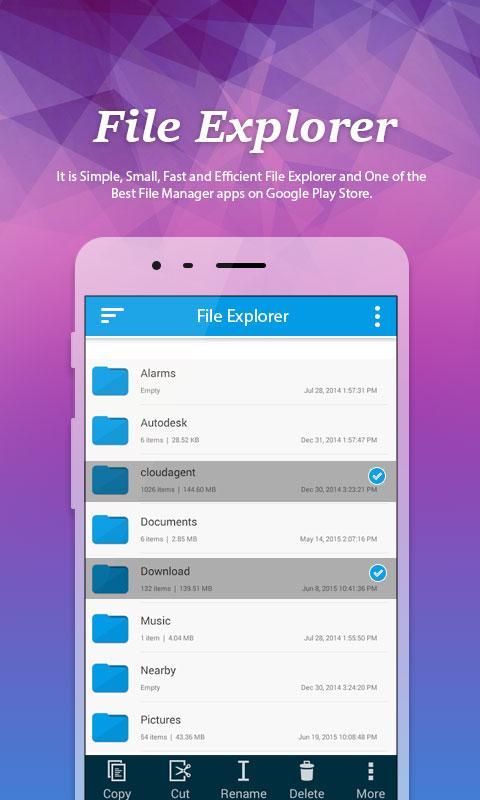
File Manager allows you to copy, move, rename, delete or share files to and from any of your storage's.
Import Export File Manager Data.
fast file explorer for smart phone 2017.
cool,light and smooth file manager. easy filemanager.
Its support android versions like kitkat file manager, lollipop file explorer, Marshmallow file manager, Naugat file manager.
Quickly access file operations.
Key Features
Supported Internal Explorer File Manger & External SD Card File Manager
Secret Applock for File Manager : Easy way to create lock password for file manager for not allow to open files,hot videos,apk,secret photos,medias, documents etc.
Hidden File Manager
- Gallery View for photos.
- Seperate Parts for all the resources like Photos, Videos, Documents, Musics, APK, and internal / External SD cards.
- Basic Options : Cut, Copy, Paste, Delete, Move, Extract, Zip, Share, Rename, New Folder etc.
- Media Partitions : From drawer to you can make it separate best media storage.
Partitions: Photos, Videos, Audio, Documents, APK Files.
- Internal & External Partitions : Handle internal or external file manager from the app. if external memory cards available
Then it will shows based on grid design.
- App Manager : Easy to find phone app manager & get appropriate operations like
Operations: Open Apk, Backup, Uninstall, Share, Properties etc
- Hide & Unhide Media : Its main feature of the app, you can hide or unhide media file & create secret collection for file explorer.
- Custom Grid Design : Select gride for your photos, videos, documents, audios etc. you can change it also from setting.
- Reaching : Its very smooth & easy to search any folders, files, or any type of collections around the phone.
- Sort : life become easy if sorting is there, Can sort Ascending or Descending Orders
Sorts : Sort by Name, Sort by Type, Sort by Last Modified, Sorting by Size
- Set As Home : set as home screen any you like, It work same like favorite option.
- Multi Selections : Choose multi-select & make operation like compress, hide, Add shortcut, share, cut, copy, delete etc.
- Fully Material Designs.
Last updated on 2017年08月08日
此版本包含小幅錯誤修正和一般改善。請更新至最新版本,以獲得最佳體驗。