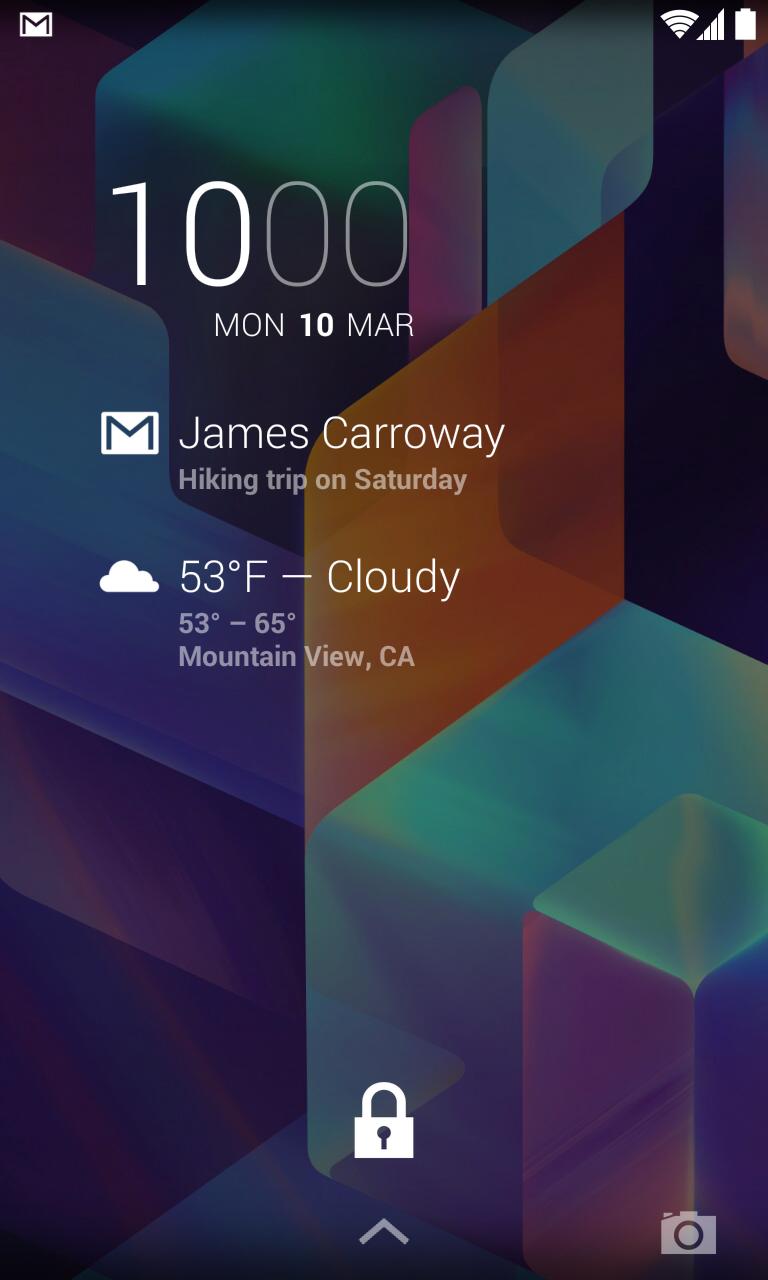
DashClock Gmail+ Extension integrates DashClock Widget with a popular email service Gmail, providing instant access to Gmail messages directly from device's lock screen. Unlike DashClock built-in Gmail extension that displays the number of unread messages, Gmail+ extension displays the number of new messages, just like the actual Gmail application does in its notifications. In addition, Gmail+ extension also displays the sender and subject of the new message, providing a much richer experience compared to the build-in extension.
Other improvements over DashClock built-in Gmail extension include:
• Clicking Gmail+ notification opens the contents of the actual message, instead of the contents of the entire inbox
• Support for persistent notification, providing quick access to Gmail directly from device's lock screen even if there are no new messages
This extension relies on notification access functionality, and requires explicitly granting notification access through system security settings, as well as enabling notifications in Gmail application settings. For convenience notification access can also be configured through DashClock extension settings.
In order to add Gmail+ Extension to DashClock Widget:
• Launch DashClock Widget settings
• Select Add Another Extension option
• Select Gmail+ from the list of available extensions
In order to configure notification access:
• Launch DashClock Widget settings
• Select settings button of DashClock Gmail+ Extension
• Select Notification access option in extension's settings
• Tick a checkbox next to DashClock Gmail+ Extension
DashClock Gmail+ Extension requires Gmail http://goo.gl/XJX8K3 and DashClock Widget http://goo.gl/9U0MyV applications installed and running.
DashClock Gmail+ Extension is an open source project, you can check out its source code at http://goo.gl/jveozD.
Latest Version
1.1Uploaded by
صفاء محمد
Requires Android
Android 4.3+
Category
Free Communication AppContent Rating
Everyone
Report
Flag as inappropriateLast updated on Nov 13, 2015
* Added compatibility with various DashClock Widget clones, including Better DashClock Widget and KK Widget.
* Introduced new setting to support interoperability with widgets other than the original DashClock Widget.
* Improved settings modification responsiveness.



APKPure - A multi-platform app store primarily focused on Android, providing extensive app-related content. Discover the app you want easier, faster, and safer, with quick and efficient downloads and installations.