You can click easily the top of the screen and the narrow range link,
by using the mouse cursor.
Operable within 1/4 of the screen, so it's easy to operate with one hand.
* Menu is displayed by the long tap.
* You can switch between right-handed and left-handed.
---
Favorite registration is very fast.
it's easy to select favorites.
The favorite list is activated from the "star icon" of the menu displayed by tapping the mouse pad for a long time.
---
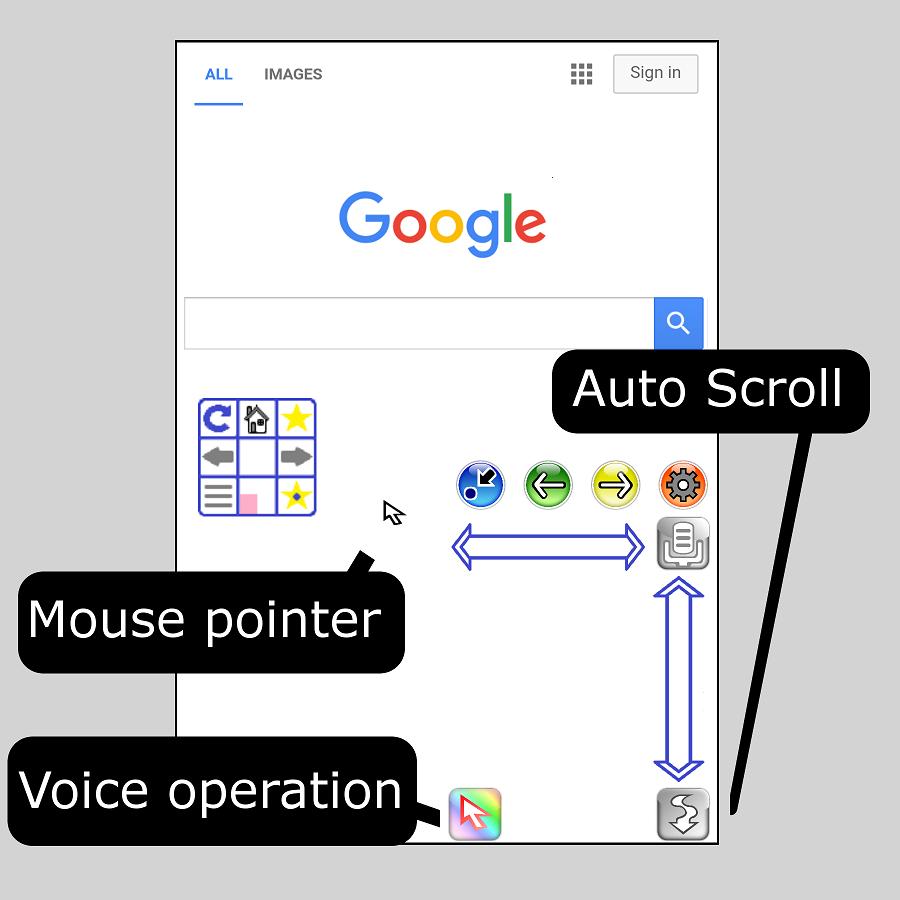
The function to operate the mouse with voice was added.
Click, Search, Back, Next, Auto Scroll etc...
---
Auto scroll function added.
You can adjust the scroll speed to 4 levels.
---
The high-speed tab switching function was added.
You can switch the display of the web page, by switching flick operation.
---
The following setting change function was added.
- Reaction speed of mouse click.
- Mouse pad transparency.
- Scroll speed.
- Movement speed of mouse pointer.
เวอร์ชันล่าสุด
3.7อัปโหลดโดย
Radha Khandelwal
ต้องใช้ Android
Android 4.0+
Category
ฟรี เครื่องมือ แอปการจัดประเภทเนื้อหา
Everyone
รายงาน
ปักธงว่าไม่เหมาะสมLast updated on Jul 17, 2017
The design has been changed.



APKPure - ร้านค้าแอปพลิเคชันแบบมัลติแพลตฟอร์มที่มุ่งเน้นระบบ Android เป็นหลัก พร้อมให้บริการเนื้อหาที่เกี่ยวกับแอปอย่างครบครัน ค้นพบแอปที่คุณต้องการได้ง่าย รวดเร็ว และปลอดภัยยิ่งขึ้น พร้อมการดาวน์โหลดและติดตั้งที่รวดเร็วและมีประสิทธิภาพ