You can click easily the top of the screen and the narrow range link,
by using the mouse cursor.
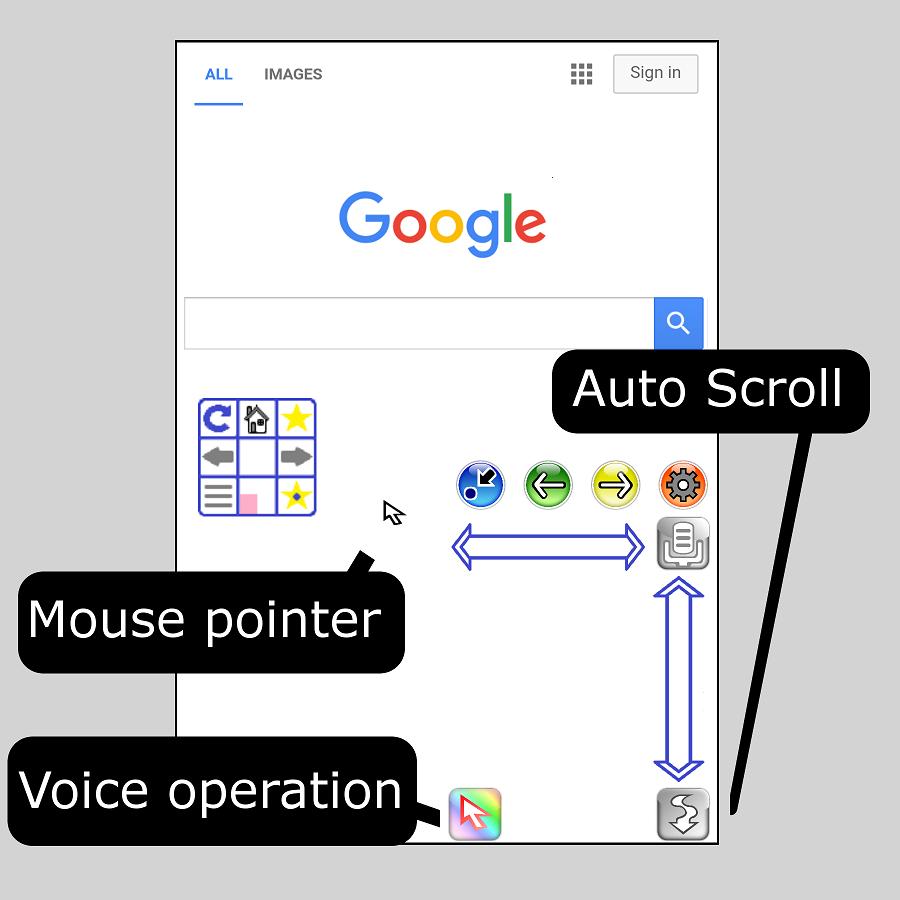
Operable within 1/4 of the screen, so it's easy to operate with one hand.
* Menu is displayed by the long tap.
* You can switch between right-handed and left-handed.
---
Favorite registration is very fast.
it's easy to select favorites.
The favorite list is activated from the "star icon" of the menu displayed by tapping the mouse pad for a long time.
---
The function to operate the mouse with voice was added.
Click, Search, Back, Next, Auto Scroll etc...
---
Auto scroll function added.
You can adjust the scroll speed to 4 levels.
---
The high-speed tab switching function was added.
You can switch the display of the web page, by switching flick operation.
---
The following setting change function was added.
- Reaction speed of mouse click.
- Mouse pad transparency.
- Scroll speed.
- Movement speed of mouse pointer.
Last updated on Jul 17, 2017
The design has been changed.



APKPure - 안드로이드를 중심으로 한 멀티플랫폼 앱스토어로, 다양한 앱 관련 콘텐츠를 제공합니다. 더 쉽고, 빠르고, 안전하게 원하는 앱을 찾아보세요. 빠르고 효율적인 다운로드와 설치가 가능합니다.