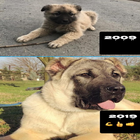
The Ten Years Challenge app allows you to compare, edit and share your photos from different times.
With the 10 years challenge app you can join this new trend in the world :)
Features of Ten Years Challenge Application
This app allows you to combine your photos at different times.
It provides background color to photos so it looks more beautiful.
Allows you to enter a message under Photos. Change the color, background and font style of this message.
Allows you to change the size of photos.
Drag and drop photos and messages to anywhere on the screen.
It allows sharing in all social media applications after editing the photos.
Ten years challenge is designed to make it easy for everyone to use.
10 years challenge application, you can use all the features of the internet.
The #10yearschallenge app can be used for many different purposes.
How does the Ten Years Challenge work?
Select two photos taken at different times. Photos may have been taken 20 years ago or 10 years ago, or 5 years ago or 1 year ago (eg 10 years ago and 10 years later).
Write your description in the description section under the photos you selected. This may be a message you want, or may be a year.
(eg 2009 for the first part and 2019 for the second part or after 2019 or before 2019)
After entering photo and message information, press the create button and go to the edit page.
The "Ten Years Challenge" app on this edit page offers us many options for editing photos and messages.
Here you can drag and drop your photos and messages with your hand, you can give the background color to your photos, change the color of the message, change the background color of the message, change the photo size, change the style of the message.
Organize your photos as you want on the edit page, then click the take screenshot button and share this screenshot in your social media account. It's that simple to use #tenyearschallenge.
Latest Version
1.6Uploaded by
Hassan Max
Requires Android
Android 4.1+
Category
Free Entertainment AppContent Rating
Everyone
Report
Flag as inappropriateLast updated on Feb 11, 2019
New Languages Supported.
Added different font styles.
You can change the background color of the photo.
You can change the text color.
The background color of the text can be changed.
Size of photos can be changed.
Quality of photos is improved.




APKPure - A multi-platform app store primarily focused on Android, providing extensive app-related content. Discover the app you want easier, faster, and safer, with quick and efficient downloads and installations.











