Initial the Small Launcher was for my old LG P705g, Now share with you.
Characteristic of the Samll Launcher:
It is a small size software to occupy less memory and can run fast. Only basic launcher functions, No complicated operation and settings, is a concise launcher.
Operating Instructions:
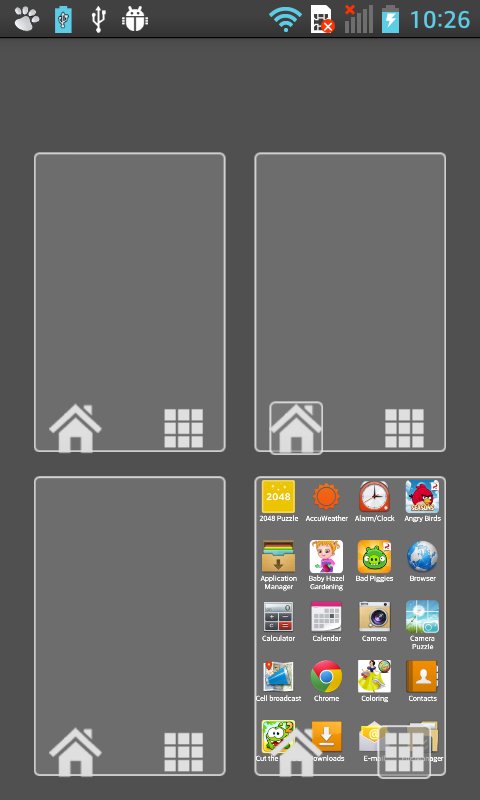
There are only four screens that can be scrolled left or right. A grid of all applications is on one of the four screens. The grid may be scrolled down or up cycle.
Move application: Long press the application icon then choose which screen to move ,and locate position to complete move. Moved icons are no longer displayed in the application grid.
Add widget:First choose one screen, then click menu>add widget, long press choose widget, then locate position to complete add operating.
(Operation is slightly different for system version lower than 4.1. Version 4.1 and higher need to add widget permission)
Set wallpaper: Pick a color (you can save memory): click center circle to confirm a color. or pick a image: confirm cut rectangle
of image, finally click OK to save the wallpaper.
Launcher Settings: Default display screen can be set, click "Back" or "Home" to return to the default display screen. You may also set the application grid displayed on which screen.
Email: junior.footprint@gmail.com
Language:English;Chinese Simple;
Version History:
<><><><><><>
June 6th, 2014 V1.0
Birthday of the Small Launcher
>
October 3, 2014 V1.1
Latest Version
1.1.7Uploaded by
Daniel Fuentes
Requires Android
Android 3.0+
Category
Free Personalization AppContent Rating
Rated for 3+
Report
Flag as inappropriateLast updated on Oct 16, 2015
>More save memory
>Remove icon at top
>Remove scroll bar
>Fixed bugs





APKPure - A multi-platform app store primarily focused on Android, providing extensive app-related content. Discover the app you want easier, faster, and safer, with quick and efficient downloads and installations.