This secu app works with our company product “secu-tag” to monitor the open/close status of home doors or windows. This product is installed in domestic door/window and targets to alert customers about any status changes.
The secu app has 4 main menu pages as follows,
home page
device page
floorplan page
profile page
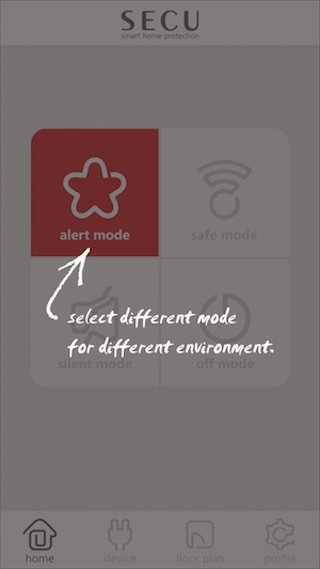
> The home page allows user to setup alert mode easily. Whenever there is “secu-tag” status change, a push message will be sent out to user’s app to alert the user.
There are ALERT, SAFE, SILENT and OFF mode to be selected.
The ALERT mode allow the app to receive “push message” with alert sound
The SAFE mode allow the app to receive “push message” with normal sound
The SILENT mode allow the app to receive “push message” with no sound
The OFF mode don’t receive any “push message”
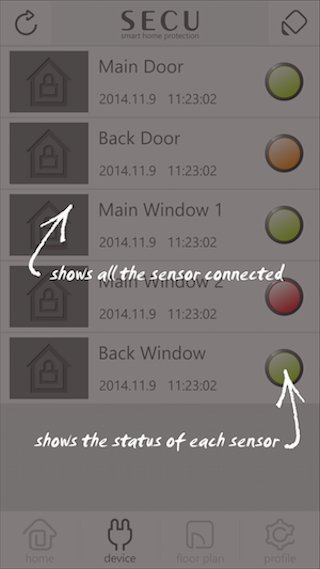
> The device page can show all "secu-tag" status in list view. All "secu-tag" status can be shown easily with different colour icons to represent different status meaning. Users can map each “secu-tag” with their phone photo and change the description accordingly. Also, user can tick the status icon to get into detail and history pages for viewing more information.
> The floorplan page can allow users to draw their own floor plans and place all “secu-tag” into the floor plan. It provides a more practical view for users to simulate where they install the “secu-tag”. Users are allowed to dynamically add/remove floor plans and draw their floor plan layout easily inside the floorplan page. Also, user can tick the status icon too to get into detail and history pages for viewing more information.
> The profile page mainly provide the user account maintenance features and product information. Users can login, logout, reset password change password and register new account inside the profile page. Also, product and producer information can be found in the profile pages too.
Latest Version
1.5.2Uploaded by
Ravindra Pawar
Requires Android
Android 3.2+
Category
Free Tools AppContent Rating
Everyone
Report
Flag as inappropriateLast updated on Apr 6, 2016
- enhance network performance
- improve user experience
- change GCM service for notification
- bug fix




APKPure - A multi-platform app store primarily focused on Android, providing extensive app-related content. Discover the app you want easier, faster, and safer, with quick and efficient downloads and installations.