HomeFeed RSS: How This Android RSS Reader Helps You Manage Content

2026-09-01
HomeFeed RSS brings feed aggregation to Android with a clean interface and useful features. Here's how it works and what makes it stand out.
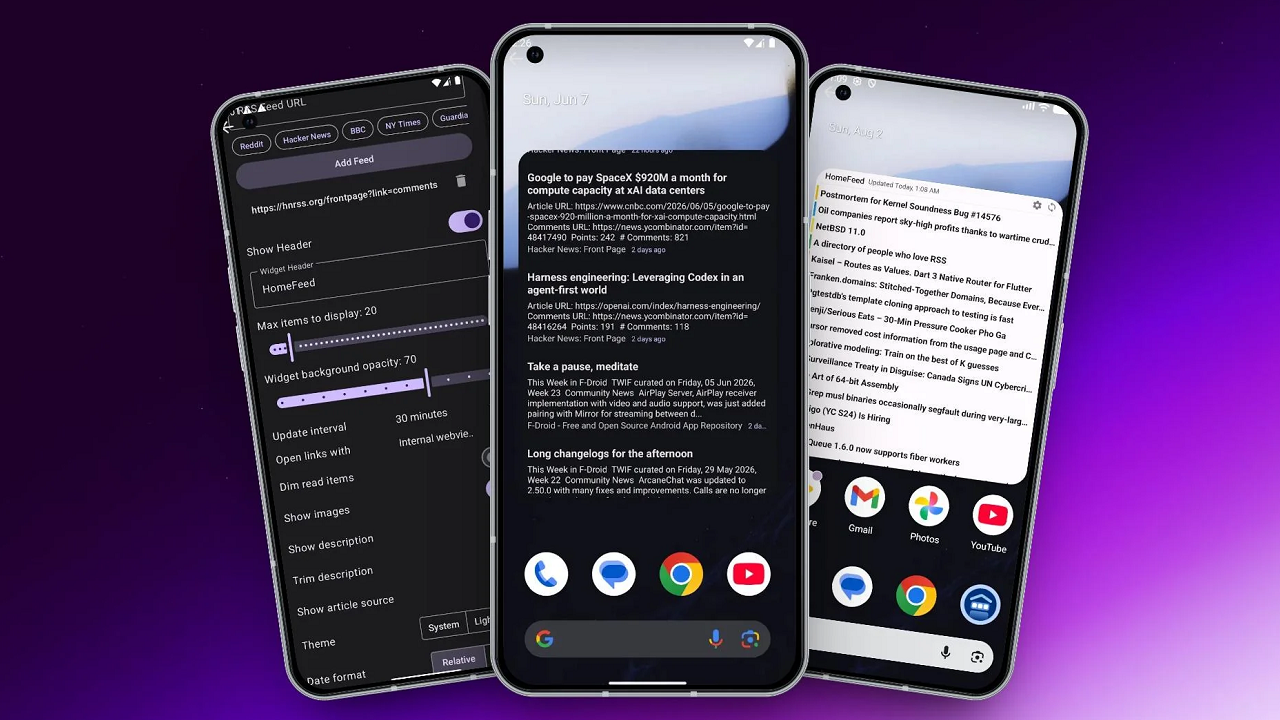
Keeping up with news, blogs, and content across the internet is harder than ever. Social media algorithms decide what you see, and they're not designed to show you everything from the sources you actually care about. That's where RSS readers come in, and HomeFeed RSS is one of the Android options worth looking at if you want to take control of your content feed.
RSS readers aren't new technology, but they've been seeing a resurgence as people move away from algorithmic timelines. The appeal is simple: you choose your sources, you get every update from those sources in one place, and no algorithm is filtering or reordering what you see. HomeFeed RSS brings that experience to Android with a mobile-first interface that works well on phones.
What Is HomeFeed RSS?
HomeFeed RSS is an Android application that lets you subscribe to RSS and Atom feeds from websites, blogs, news outlets, and other content sources. Instead of visiting each site individually or relying on social media to surface articles, the app pulls new content from your subscribed feeds into a single readable stream.
The app supports standard RSS 2.0, RSS 1.0, and Atom feed formats, which covers essentially every content website that offers a feed. You can add feeds manually by entering the URL, or you can import a feed list in OPML format, which is the standard format for exporting subscriptions from other RSS readers. That makes switching from another reader relatively painless.
HomeFeed RSS is designed for Android first, which means it takes advantage of platform features like background sync, notifications, and material design principles. The interface is built for touch navigation, with swipe gestures for marking articles as read and long-press menus for managing subscriptions.
Key Features of HomeFeed RSS
The feature set of HomeFeed RSS covers what most users need from an RSS reader without bloating the app with unnecessary extras. Here are the main features:
- Feed Subscription and Management: You can add feeds by URL, search for feeds by site name, or import an OPML file. Once subscribed, the app checks for new content on a schedule you configure. You can set different sync intervals for Wi-Fi and mobile data to control data usage.
- Reading Interface: The built-in article reader displays content in a clean, distraction-free format. You can adjust font size, switch between light and dark themes, and choose between a card-based layout that shows images and excerpts or a compact list view that prioritizes density.
- Categories and Folders: Feeds can be organized into folders, and you can navigate by folder to see updates from a specific group of sources. That's useful if you want to separate work-related feeds from entertainment or if you follow feeds in multiple languages and want to read them separately.
- Offline Reading: The app caches article content when it syncs, so you can read without an active internet connection. That's handy for commutes, flights, or anywhere with spotty connectivity. Images and full-text content are stored locally, and the cache can be managed in settings to control storage usage.
- Notifications: You can enable notifications for specific feeds so you get alerted when high-priority sources publish new content. The notification system lets you set per-feed priority levels, so a breaking news feed can trigger an alert while a blog that updates weekly stays silent.
- Full-Text Extraction: For feeds that only publish excerpts, HomeFeed RSS can fetch the full article text from the source website. This feature doesn't work on every site, as some publishers block full-text extraction, but it works on most blogs and many news sites.
How HomeFeed RSS Compares to Other RSS Readers
The Android RSS reader field has several options, and HomeFeed RSS occupies a middle ground between minimal readers and full-featured paid services.
Compared to Feedly, one of the most popular RSS readers, HomeFeed RSS is simpler and doesn't require an account. Feedly offers more advanced features like AI-assisted topic discovery and team sharing, but those features come with a subscription fee and a more complex interface. HomeFeed RSS focuses on the core experience of reading feeds without the overhead.
Compared to open-source readers like Flym or FeedReader, HomeFeed RSS offers a more polished interface and better full-text extraction. The open-source options are free and ad-free, but they can be rougher around the edges in terms of design and may not handle complex feeds as well.
The main trade-off with HomeFeed RSS is that it's a local-only reader. Your subscriptions and read state are stored on your device, not synced to a cloud account. If you switch phones, you'll need to export your OPML file and import it on the new device. If you read on multiple devices and want sync, you'll need a different app.
Setting Up HomeFeed RSS for the First Time
Getting started with HomeFeed RSS takes a few minutes. Here's a quick walkthrough:
- Install the app on your Android device.
- On first launch, the app shows an empty feed with an option to add sources.
- Tap the add button and enter a feed URL or search for a website name. Many popular sites have their feeds auto-discovered when you enter the homepage URL.
- If you're migrating from another reader, use the OPML import option in settings to bring your existing subscriptions.
- Organize feeds into folders by long-pressing a feed and selecting "Move to folder."
- Configure sync settings: go to Settings > Sync to set the update interval, choose whether to sync on mobile data, and set whether to download full text.
- Enable dark mode if you read at night: Settings > Theme > Dark.
The app will start pulling content from your subscribed feeds on the schedule you set. New articles appear in the main feed, and you can swipe to mark as read or tap to open the full article.
Who Should Use an RSS Reader?
RSS readers aren't for everyone, but they solve a specific problem well. If you follow more than a handful of websites regularly and you're tired of missing updates because social media algorithms don't show you everything, an RSS reader is the solution.
HomeFeed RSS is a good fit for users who want a straightforward, no-account-required reader that works well on Android. It's also useful for people who read in environments with limited connectivity, since the offline caching means your articles are always available.
If you're a power user who needs cross-device sync, team collaboration features, or AI-assisted content discovery, you might outgrow HomeFeed RSS. But for personal reading and basic feed management, it covers the essentials without unnecessary complexity.
HomeFeed RSS won't replace your social media apps, but it gives you a reliable way to follow the sources that matter to you without an algorithm getting in the way. If you've never used an RSS reader before, the concept might feel old-school, but that's kind of the point. Sometimes the simplest solution is the one that works best, and for following content across the web without interference, RSS is still hard to beat.
Additionally, you might want to check out Feedly, which is a highly versatile RSS reader.

A single place to organize, read, and share all the content you need to succeed
 NEWS
NEWS REVIEWS
 HOWTO
HOWTO