7 Best Parental Control Apps for Android in 2026

2026-08-27
Compare the top parental control apps for Android in 2026. From free options like Google Family Link to social media monitoring with Bark, find the right tool to keep your kids safe online.
On August 26, 2026, Meta agreed to a landmark $18 billion settlement with 47 US states over child safety concerns. The settlement forces Meta to restrict kids' access to Instagram and Facebook and implement age verification for younger users. But here's the problem: age verification technology is still unreliable, and it often puts kids' privacy at risk by collecting sensitive data before they can even open an app.
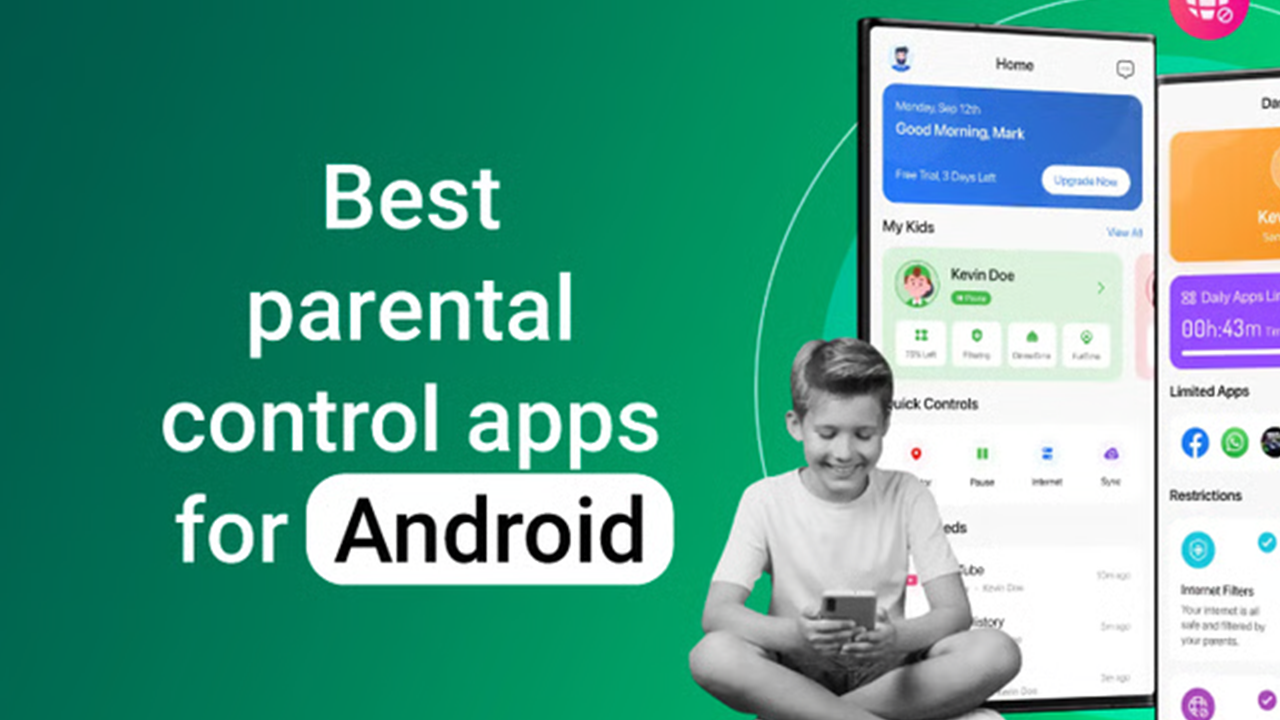
That's where parental control apps come in. Instead of relying on platforms to police themselves, parents can take matters into their own hands with tools that filter content, limit screen time, track location, and monitor app usage. If you're looking for the best parental control Android has to offer, you're in the right place. We tested and compared seven child safety apps so you don't have to.
Quick Picks
| App | Developer | Highlights | Price |
|---|---|---|---|
| Google Family Link | Screen time, app approvals, location tracking | Free | |
| Norton Family | NortonLifeLock | Web filtering, time supervision, activity reports | Free basic; Premium with Norton 360 |
| Kaspersky Safe Kids | Kaspersky Lab | GPS tracking, battery alerts, app blocking | Free basic; Premium $14.99/year |
| Bark | Bark | Social media monitoring, text alerts, web filtering | $5/month (Bark Jr); $14.99/month (Premium) |
| FamiSafe | Wondershare | Location tracking, app blocker, content filter | $9.99/month; $59.99/year |
| Kidslox | Kidslox | Screen time limits, app management, location | Free basic; $39.99/year |
| Mobicip | Mobicip | Web filtering, screen time, app blocking | Free basic; $7.99/month |
Google Family Link
The free, no-frills option straight from Google
Google Family Link is the go-to parental control app for Android users who want something simple and free. It lets you set daily screen time limits, approve or block apps from Google Play, and see your child's location on a map. You can also lock their device remotely when it's time for dinner, homework, or bed.
The app works best for kids under 13 who have their own Android device. Once your child turns 13, they can opt out of Family Link on their own, which is something to keep in mind. For younger kids, it covers the basics well. You get app installation controls, screen time management, and location sharing without paying a dime.
The downside is that Google Family Link doesn't offer web filtering or social media monitoring. If your child is old enough to browse the web or use Instagram, you'll need something more powerful. It also doesn't let you set different screen time limits for different apps, which is a feature many parents want.
Pros
- Completely free with no hidden costs
- Easy setup if your child has an Android device
- App approval system works well
- Location tracking included
Cons
- No web filtering or content blocking
- Kids can opt out at age 13
- Limited to Google's own apps and services
- No social media monitoring
| Specs | Details |
|---|---|
| Price | Free |
| Key Features | Screen time limits, app approvals, location tracking, device lock |
| Age Range | Under 13 |
| Best For | Parents wanting basic, free controls |

Google Family Link is a parental controls app that helps you guide your child’s device use and online safety.
Norton Family
Web filtering and activity reports from a trusted name
Norton Family is a solid parental control app that focuses on web filtering and time supervision. The app blocks inappropriate websites across categories like adult content, gambling, and violence. It also gives you detailed activity reports so you can see what your child has been up to online.
One of Norton Family's strongest features is its time supervision tool. You can set time limits for specific apps or overall device usage, and the app will notify you when time is running low. The Instant Lock feature lets you pause internet access with one tap, which is handy when you need your child's attention right now.
The free version covers web filtering and time limits. If you want more advanced features, Norton 360 subscriptions include Norton Family Premium, which adds features like video monitoring and broader device coverage. The app does use a VPN to filter web traffic, which can sometimes interfere with other apps or drain battery faster than expected.
Pros
- Strong web filtering with category-based blocking
- Detailed activity reports
- Instant Lock to pause internet access
- Free version covers the basics
Cons
- VPN-based filtering can drain battery
- Social media monitoring is limited
- Setup can be tricky for non-technical parents
- Some features locked behind Norton 360 subscription
| Specs | Details |
|---|---|
| Price | Free basic; Premium with Norton 360 subscription |
| Key Features | Web filtering, time supervision, activity reports, instant lock |
| Age Range | All ages |
| Best For | Parents who want strong web filtering |

Norton Family helps you manage the time your kids spend online.
Kaspersky Safe Kids
GPS tracking and app blocking with a generous free tier
Kaspersky Safe Kids offers a well-rounded set of parental control features. The free version includes app blocking, screen time limits, and a real-time GPS location tracker. That's more than what most free parental control apps give you. The premium tier adds web filtering, social media monitoring, and battery level alerts so you know when your child's phone is about to die.
The app's location tracking is accurate and updates frequently. You can set up safe zones and get notified when your child enters or leaves a specific area. The app blocker lets you hide apps from your child's device entirely, which is useful if you don't want them accessing certain games or social platforms.
Kaspersky Safe Kids also includes a feature that shows you what apps your child is using and for how long. This gives you a clear picture of their digital habits without having to peek over their shoulder. The premium plan costs $14.99 per year, which is one of the most affordable paid options on this list.
Pros
- Free version includes GPS tracking and app blocking
- Affordable premium plan at $14.99/year
- Safe zone alerts for location tracking
- Battery level notifications
Cons
- Web filtering only on premium tier
- App can be resource-heavy on older devices
- Social media monitoring is basic
- No text message monitoring on Android
| Specs | Details |
|---|---|
| Price | Free basic; Premium $14.99/year |
| Key Features | GPS tracking, app blocking, screen time limits, web filtering (premium) |
| Age Range | All ages |
| Best For | Parents who want location tracking on a budget |

Your kids protection with web filter, screen time, YouTube & games control
Bark
Social media monitoring that actually alerts you
Bark takes a different approach from most parental control apps. Instead of blocking everything, it monitors your child's text messages, emails, and social media accounts for potential risks. When it detects something concerning like cyberbullying, depression signals, or inappropriate content, it sends you an alert. This means your child can use their phone normally while you stay informed about what matters.
Bark monitors over 30 social media platforms including Instagram, Snapchat, TikTok, and YouTube. It uses AI to scan messages and posts for warning signs, so you don't have to read every single message your child sends. The app also includes web filtering and screen time management, but its real value is in social media monitoring.
The Meta settlement highlights exactly why Bark exists. Instagram and Facebook are now required to verify ages and restrict access for minors, but the platforms themselves can't monitor what kids actually say to each other in DMs and comments. Bark fills that gap by watching for danger signs across social platforms and texting apps.
Bark Jr costs $5 per month and covers web filtering and screen time. Bark Premium costs $14.99 per month and adds social media monitoring, text alerts, and email monitoring. It's one of the more expensive options, but the social media monitoring is something no other app on this list does as well.
Pros
- Monitors 30+ social media platforms
- AI-powered alerts for cyberbullying and mental health signals
- Web filtering and screen time included
- Doesn't require reading every message
Cons
- More expensive than most alternatives
- Social monitoring requires your child's account credentials
- Can generate false positives in alerts
- Limited app blocking features compared to competitors
| Specs | Details |
|---|---|
| Price | $5/month (Bark Jr); $14.99/month (Premium) |
| Key Features | Social media monitoring, text alerts, web filtering, screen time |
| Age Range | All ages |
| Best For | Parents concerned about social media risks |

Bark detects cyberbullying, sexting, depression, etc. on social media/text/email
FamiSafe
Location tracking and app blocking in one package
FamiSafe by Wondershare is a feature-rich parental control app that covers location tracking, app blocking, web filtering, and screen time management. It also includes a driving report feature that tells you how fast your teen is driving and whether they're using their phone behind the wheel.
The app's real-time location tracking is accurate and includes geofencing. You can set up safe zones like school and home, and get alerts when your child arrives or leaves. The app blocker lets you block specific apps during certain times, like homework hours or bedtime. You can also set daily screen time limits that apply across all apps.
FamiSafe's content filter blocks inappropriate websites across categories. It also includes a feature that detects suspicious photos on your child's device, which can alert you to content you'd want to discuss with them. The app supports monitoring WhatsApp messages and social media activity, but the depth of monitoring varies by platform.
Pricing starts at $9.99 per month for a monthly plan. The yearly plan drops to $4.99 per month when billed annually at $59.99, which makes it more affordable if you commit long-term. A free tier covers basic location tracking.
Pros
- Driving reports for teen drivers
- Accurate real-time location tracking
- Suspicious photo detection
- Flexible pricing with annual discount
Cons
- Monthly plan is pricey compared to alternatives
- Social media monitoring is limited compared to Bark
- Some features require background permissions that drain battery
- Setup can be confusing with multiple configuration steps
| Specs | Details |
|---|---|
| Price | $9.99/month; $59.99/year ($4.99/month) |
| Key Features | GPS tracking, app blocker, web filtering, driving reports, suspicious photo detection |
| Age Range | All ages |
| Best For | Parents of teens who want location and driving monitoring |

FamiSafe upgrades social media detection to help families stay safer online.
Kidslox
Simple screen time limits and cross-platform support
Kidslox focuses on screen time management and app blocking without overwhelming you with features. It lets you set daily screen time limits, block specific apps, and create schedules for when your child can use their device. The app also includes location tracking and a feature called "Flip," which lets you instantly switch your child's device between adult mode and child mode.
What makes Kidslox stand out is its cross-platform support. You can manage your child's screen time on Android, iOS, and Kindle devices from a single parent dashboard. If your family uses a mix of devices, this is one of the few apps that handles all three platforms well.
The free version gives you basic screen time limits for one device. The premium plan costs $39.99 per year and supports unlimited devices, adds location tracking, and removes ads. Kidslox also includes a 3D geographic area feature that lets you draw custom safe zones on a map, which is more flexible than the circular zones most apps use.
Pros
- Cross-platform support for Android, iOS, and Kindle
- Simple, focused on screen time
- Custom safe zone drawing on a map
- Affordable annual pricing
Cons
- No web filtering or content blocking
- Social media monitoring not included
- Free version is very limited
- App interface feels dated
| Specs | Details |
|---|---|
| Price | Free basic; $39.99/year Premium |
| Key Features | Screen time limits, app blocking, location tracking, cross-platform |
| Age Range | All ages |
| Best For | Families with mixed Android and iOS devices |

Limit screen time, Block Apps & Games, Monitor with Parental control app
Mobicip
Web filtering and screen time for school-age kids
Mobicip is a parental control app built around web filtering and screen time management. It uses a cloud-based filtering system that blocks inappropriate content across browsers, apps, and YouTube. The app lets you set daily screen time limits, block apps, and see detailed reports of what your child is doing online.
One feature that sets Mobicip apart is its school-specific filtering. You can set different filtering rules for school hours, free time, and bedtime. During school hours, the app can block games and social media while allowing educational content. This makes it a good pick for parents of school-age kids who use their devices for both learning and entertainment.
The free version covers basic web filtering and screen time for one device. The premium plan at $7.99 per month adds app blocking, location tracking, and supports up to five devices. Mobicip also offers a family plan that covers more devices at a higher price point.
Pros
- School-time filtering schedules
- Cloud-based web filtering works across browsers
- YouTube filtering included
- Affordable premium pricing
Cons
- No social media monitoring
- App blocking only on premium tier
- Location tracking is basic
- Interface can be slow to load
| Specs | Details |
|---|---|
| Price | Free basic; $7.99/month Premium |
| Key Features | Web filtering, screen time, app blocking, YouTube filtering |
| Age Range | School-age and up |
| Best For | Parents of school-age kids who use devices for learning |

Set screen time limits, block apps & porn, filter sites, and track kids location
How to Choose the Right Parental Control App
Picking the right parental control app depends on your child's age, what devices they use, and what risks you're most concerned about. Here's a quick guide to help you decide.
If your child is under 13 and you want something free, start with Google Family Link. It covers the basics without costing you anything. If web filtering is your top priority, Norton Family or Mobicip are your best bets. Both offer strong content filtering that works across browsers and apps.
For parents worried about social media, Bark is the clear winner. Its AI-powered monitoring across 30+ platforms is something no other app matches. The Meta settlement proves that platforms can't protect your kids on their own, so having a tool that watches for danger signs in DMs and posts is valuable.
If you want location tracking and driving reports, FamiSafe or Kaspersky Safe Kids are solid picks. Kaspersky's free version includes GPS tracking, which is hard to beat. For families with mixed Android and iOS devices, Kidslox is the most practical choice.
Conclusion
The Meta $18 billion settlement shows that social media platforms can't be trusted to police themselves when it comes to child safety. Age verification requirements and restricted access for minors are steps in the right direction, but they're not enough. Parents need tools that give them real visibility into what their kids are doing online.
Parental control apps fill that gap. Whether you want something free like Google Family Link, full-featured like Bark, or affordable like Kaspersky Safe Kids, there's an option on this list that fits your needs. The best app is the one you'll actually use consistently, so pick one that matches your parenting style and your child's digital habits. You can download any of these Android parental control apps directly from APKPure using the download cards above, or from Google Play if you prefer.
 NEWS
NEWS REVIEWS
 HOWTO
HOWTO