
TalkBack, Kickback, and SoundBack are apps for the Android Accessibility Service to help blind and vision-impaired users use their devices more easily.
These apps add spoken, audible, and vibration functionality services to your device. They are system applications that were pre-installed on most device and are updated when the accessibility service is improved.
These apps only get activated if you explicitly turn on Accessibility.
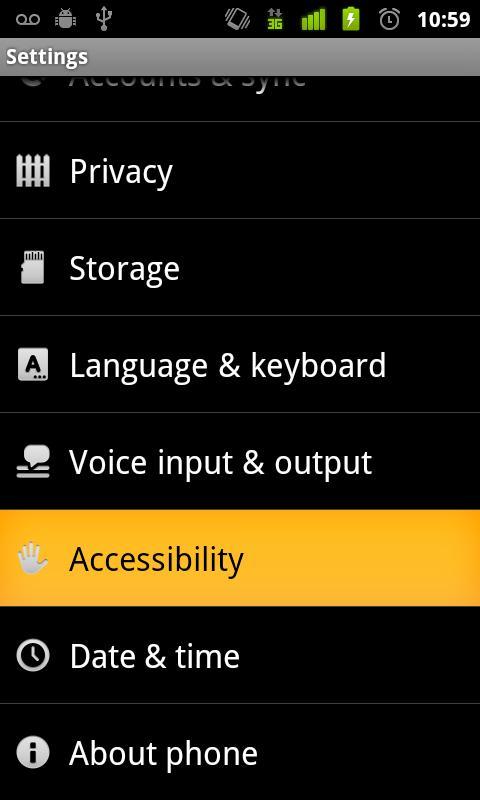
Steps to activate Accessibility:
1. Go to Settings
2. Select Accessibility
3. Enable Accessibility checkbox
4. Enable TalkBack, KickBack, SoundBack checkboxes
Laatste Versie
1.1.2Android vereist
1.6 - 3.2
Categorie
Gratis Tools APPInhoudsbeoordeling
Everyone
Melden
Rapporteer als ongepastLast updated on May 2, 2012
Deze versie bevat kleine bugfixes en algemene verbeteringen. Werk bij naar de nieuwste versie voor de beste ervaring.



APKPure - Een multi-platform appstore die zich voornamelijk richt op Android en uitgebreide app-gerelateerde content biedt. Ontdek de app die je wilt, eenvoudiger, sneller en veiliger, met snelle en efficiënte downloads en installaties.











![[DEPRECATED] Chrome to Phone-APK](https://image.winudf.com/v2/image/Y29tLmdvb2dsZS5hbmRyb2lkLmFwcHMuY2hyb21ldG9waG9uZV9pY29uXzBfNTk1ZGFlZWE/icon.png?w=102&fakeurl=1)





