
TalkBack, Kickback, and SoundBack are apps for the Android Accessibility Service to help blind and vision-impaired users use their devices more easily.
These apps add spoken, audible, and vibration functionality services to your device. They are system applications that were pre-installed on most device and are updated when the accessibility service is improved.
These apps only get activated if you explicitly turn on Accessibility.
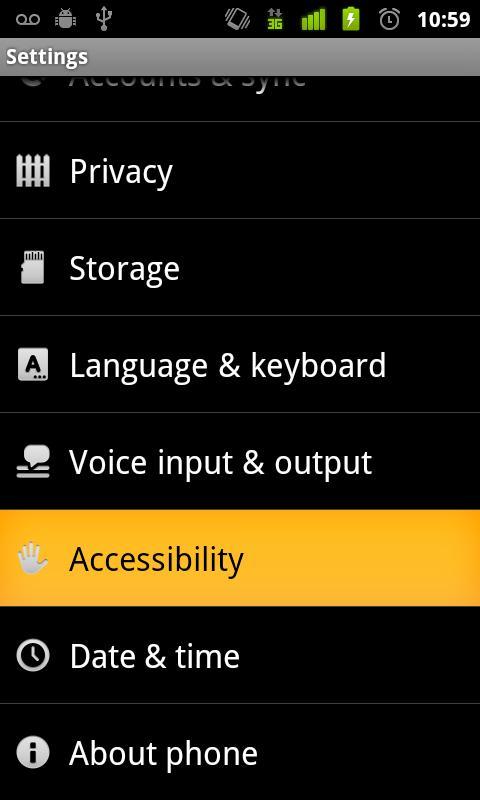
Steps to activate Accessibility:
1. Go to Settings
2. Select Accessibility
3. Enable Accessibility checkbox
4. Enable TalkBack, KickBack, SoundBack checkboxes
Last updated on May 2, 2012
이 버전에는 사소한 버그 수정과 전반적인 개선 사항이 포함되어 있습니다. 최상의 환경을 위해 최신 버전으로 업데이트하세요.


APKPure - 안드로이드를 중심으로 한 멀티플랫폼 앱스토어로, 다양한 앱 관련 콘텐츠를 제공합니다. 더 쉽고, 빠르고, 안전하게 원하는 앱을 찾아보세요. 빠르고 효율적인 다운로드와 설치가 가능합니다.











![[DEPRECATED] Chrome to Phone APK](https://image.winudf.com/v2/image/Y29tLmdvb2dsZS5hbmRyb2lkLmFwcHMuY2hyb21ldG9waG9uZV9pY29uXzBfNTk1ZGFlZWE/icon.png?w=102&fakeurl=1)









