Package Name:com.amazinglab.next
SHA-256:298130353957e2ad1444c319c4bb94effa935f7f25498beab4b2655cac3523f9
Show More
Next replaces your home screen with what matters right now.
Open your phone and one big card says it: "Design review in 12 min" with Join call, a missed call, Close your day in the evening, or the weather on a free day. Under it, Then shows the next two things. Everything else waits quietly in Queue, and promos fold away.
What you get:
• The now card: the one thing that matters right now, over a real sky photo that follows the hour and the weather. Then shows what comes after, and Show all lists every card and today's agenda.
• Tiles that open in place: weather, the morning brief, habits, lists, tomorrow and screen time.
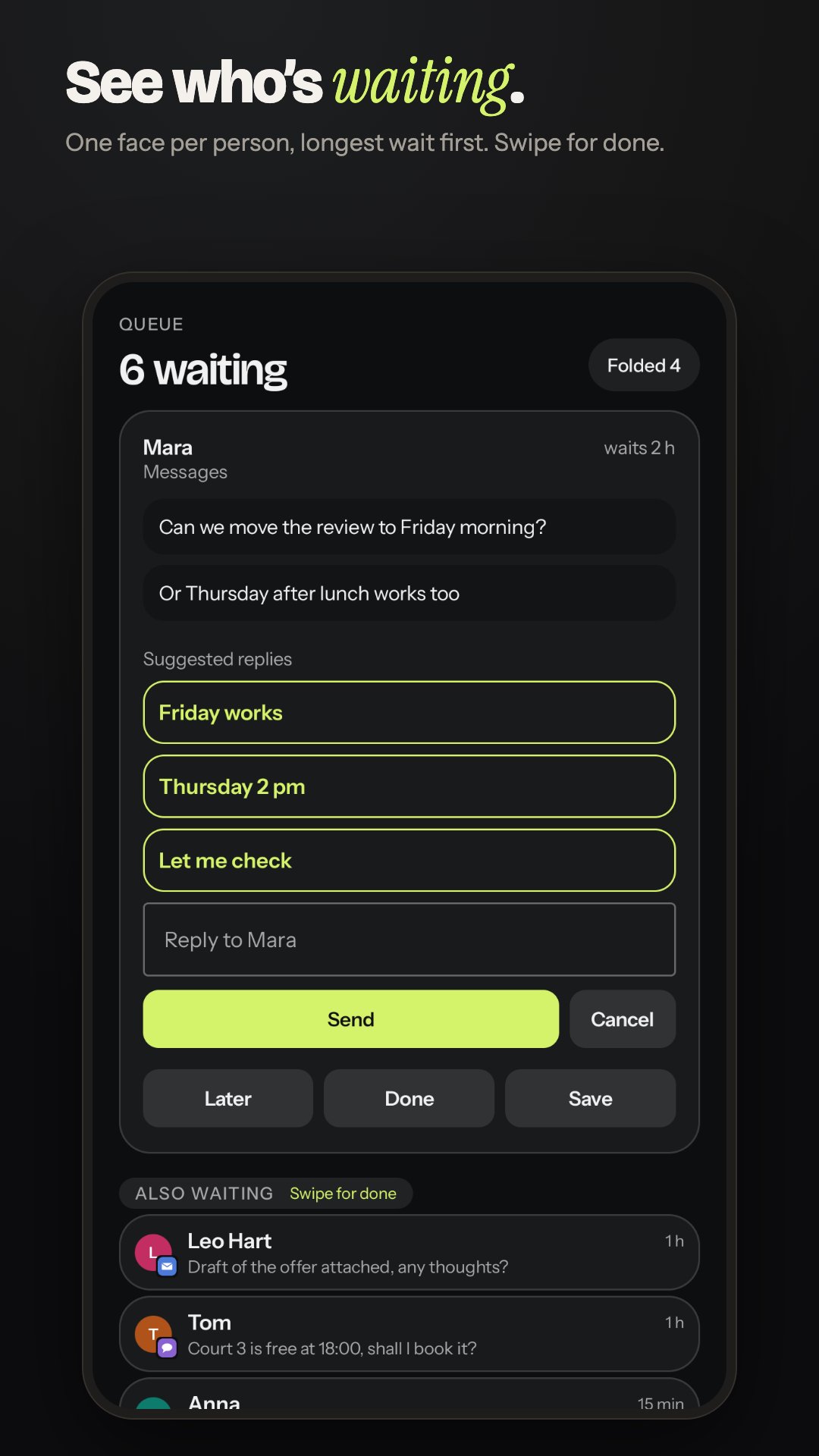
• Queue, by who is waiting: one face per person, longest wait first. Reply in place, swipe for done, or pick Later.
• Handled in the app: when the app clears its notification, when you open the app after a message came, or when a meeting is over, it leaves Next and Queue.
• Close your day in 30 seconds: what you finished, what moves to tomorrow, and tomorrow's first thing.
• Saved: one list for links, photos, stories and messages you want to come back to.
• News: a briefing of what is new since you last looked, then a magazine of your topics.
• A search-first app list: swipe up and type. Initials and a typo still find the app, and the apps you usually open at this hour sit on top.
• Habits on your home screen: rings to tap, timer habits, a streak and the week at a glance.
• Living Home: before a meeting, in the car, at the gym or with headphones in, what that moment needs comes first. It learns on your phone.
• Smarter Later: "After this meeting" and "When you're free", from your calendar.
• Parcels and bills, read on your phone: deliveries with Track, renewals before they charge.
• Focus timer, Leave now nudges, birthdays from your contacts and calendar, and Now playing with the player's buttons.
• One bar to ask or search: open apps, set a timer, "remind me at 5 to call the bank", call a contact, start a focus session, search the web.
• Your look: Classic dark with the lime accent. With Next Pro: any accent colour and background, three styles (Classic dark, Playful, Soft pastel), icon packs and wallpaper colours. Widgets too.
• Made for foldables: unfolded, Next sits beside Queue, and folding or unfolding keeps your place.
Private by design. Ranking, Living Home, parcels, bills, birthdays, habits and the focus timer all run on your phone. Next has no ads. Play builds send crash reports only, to fix bugs. Notification text never leaves your phone unless you turn on a cloud feature in Next Pro.
Next Pro (yearly, with a free trial set in Play, or once for ever):
• AI understanding for anything you type or say, and AI reply drafts, on the phone where supported or in the cloud when you allow it.
• Summarise chat: one long Queue chat in a few lines, only when you tap. Needs Gemini Nano on the phone or Cloud drafts.
• App limits: a pause when you open an app from Next past its daily limit, with one notice a day.
• Message to action: a day and time in a message offers Add to calendar and Remind me, worked out on the phone, in English, German, Italian and Spanish.
• Habit insights, habits that count themselves, and quit habits.
• Your look (styles, accent colours, backgrounds, icon packs), Your week on Sundays, and what your subscriptions cost each month.
Accessibility service (optional): Next includes an accessibility service called "Next screen lock". It is used only for two gestures you turn on yourself in Settings, Home, Gestures: double tap an empty spot on Home to lock the screen, and swipe down to open quick settings. Next explains this and asks before Android's Accessibility settings open. The service does not read your screen, receives no events from other apps, and collects or shares no data. Next works fully without it.
Every permission is explained and optional: Next works with any of them turned off.
Latest Version
0.287.0Uploaded by
Torki Mwald
Requires Android
Category
Free Personalization AppContent Rating
Everyone
Security Report
Check Now
Report
Flag as inappropriateLast updated on Nov 18, 2026
Atmosphere: rain, snow, storms, fog and starry nights fall on your Home cards, following the weather.
Hold an app to read what it has waiting. Search finds single Next settings, like rain or backup.
Weather cards warn of icy roads, rain later, heat and high UV. New news stories are marked New.




APKPure - A multi-platform app store primarily focused on Android, providing extensive app-related content. Discover the app you want easier, faster, and safer, with quick and efficient downloads and installations.