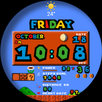
WATCH FACE INSTALLATION NOTES:
(Please update your android to lastest version)
How to install Watch Face to Wear OS Watch follow the link below:
https://drive.google.com/file/d/1ImPlWZFNPQwox8T8cEQUBKP-e4aT2vWF/view?usp=sharing
Check your watch's compatibility with WEAR OS before proceeding with the installation. (Note: Galaxy Watch 3 and Galaxy Active are not WEAR OS devices.)
✅ Compatible devices include API level 34+ for Wear OS 5+ devices
🚨 Watch faces don't automatically apply on your watch screen after the installation. That's why you MUST set it on your watch's screen.
Features:
- effect Notification message
- Digital Styles (12/24 Hour Time format)
- Date , Day of week , Month , Moon Phase
- Steps Count , Heart Rate , Battery Level , Count message unread
- Changeable backgrounds
- Changeable Colors / day by day
- Battery subdial with red indicator at 0% - 15%
- Battery subdial with green indicator at 100%
CUSTOMIZATION:
1. Press and hold display then hit "Customize".
2. Swipe left and right to choose what to customize.
3. Swipe up and down to choose options available.
4. Hit "OK".
PRESET APP SHORTCUTS:
- Shortcut Steps day
- Shortcut Heart rate
- Shortcut Settings
- Shortcut Music
- Shortcut Phone
- Shortcut Sport
CUSTOMIZABLE APP SHORTCUTS
1. Press & hold display then Customize
3. Find Complication, single tap to set preferred app in the shortcuts.
For further support, please contact: ejimatsus@gmail.com
Thank you for Your support.
Latest Version
1.0.0Requires Android
11
Category
Personalization AppContent Rating
Everyone
Report
Flag as inappropriateLast updated on Jan 11, 2025
This release includes minor bug fixes and general improvements. Update to the latest version for the best experience.




APKPure - A multi-platform app store primarily focused on Android, providing extensive app-related content. Discover the app you want easier, faster, and safer, with quick and efficient downloads and installations.