You can record every item or what to do with time, such as work or play.
You can enter the item name your own favorite things.
You can enter up to a maximum of 99 lines.
Can you measure up to 99 hours, 59 minutes and 59 seconds.
If you close the application once, save the current state of the body automatically,
To restore the state of the last When you start the app again.
Has been counted as time continues.
We measured the exact time to get the system time of the body.
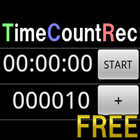
[Button Description]
+TIME :Measurement time will be added.
+SW :Stopwatch will be added.
+COUNT:Counter will be added.
AC :And remove all items.
T/Y :The switching of the ON / OFF of the display date of +TIME.
[Item Description]
When you press the button number to the left, or you can enter the name of the item, remove reset of time, of the item.
+TIME :It measures the time elapsed from the start time and end time you press the START. Will stop when you press the STOP.
S:Start time, E:End time, P:Passage time
+SW :It measures the time in milliseconds by pressing the START. Will stop when you press the STOP.
+COUNT:- You press the -1 count. + When you press the +1 count.
※ For saving the file please buy the paid version.
※ Functionality of the paid version.
Can be saved in txt or csv to SD card recording.
[Description menu button]
Save File : Create a folder on the SD card TimeCountRec, and then save the data.
Delete File : Delete the data saved in the SD card.
When you save the file, press the button and get the date and time, (the current date, hour, minute) input frame is placed in the name.
You can easily save the file with the date and press OK button directly.
Delete files so that come packed with features, you can easily organize files in the SD card.
[File format]
When the file is saved, the file type is csv, txt,
You can select character code UTF-8, Shift-JIS, JIS, EUC-JP.
Line feed code can be selected LF(Android/Linux), CR(Macintosh), CRLF(Windows).
[Example of CSV output files to be saved]
TIME,Name1,S:2012/05/01,13:30:28,E:2012/05/01,14:00:29,P:00:30:01
STOPWATCH,Name2,00:30:01:44
COUNT,Name3,100
※ Access permissions
Storage:Contains in order to save the file to the SD card.
Last updated on May 20, 2012
이 버전에는 사소한 버그 수정과 전반적인 개선 사항이 포함되어 있습니다. 최상의 환경을 위해 최신 버전으로 업데이트하세요.



APKPure - 안드로이드를 중심으로 한 멀티플랫폼 앱스토어로, 다양한 앱 관련 콘텐츠를 제공합니다. 더 쉽고, 빠르고, 안전하게 원하는 앱을 찾아보세요. 빠르고 효율적인 다운로드와 설치가 가능합니다.